<?xml version="1.0" encoding="utf-8"?>
    <feed xmlns="http://www.w3.org/2005/Atom">
     <title>NeetoForm Blog</title>
     <link href="https://www.neeto.com/neetoform/blog/feed.xml" rel="self"/>
     <link href="https://www.neeto.com/neetoform/blog"/>
     <updated>2026-06-04T01:09:46Z</updated>
     <id>https://www.neeto.com/neetoform/blog</id>
     <entry>
       <title><![CDATA[February 2026 - Webhook simplification, campaign tracking & bug fixes]]></title>
       <author><name>Sagar Anadkat</name></author>
      <link href="https://www.neeto.com/neetoform/blog/february-2026"/>
      <updated>2026-03-08T18:30:00Z</updated>
      <id>https://www.neeto.com/neetoform/blog/february-2026</id>
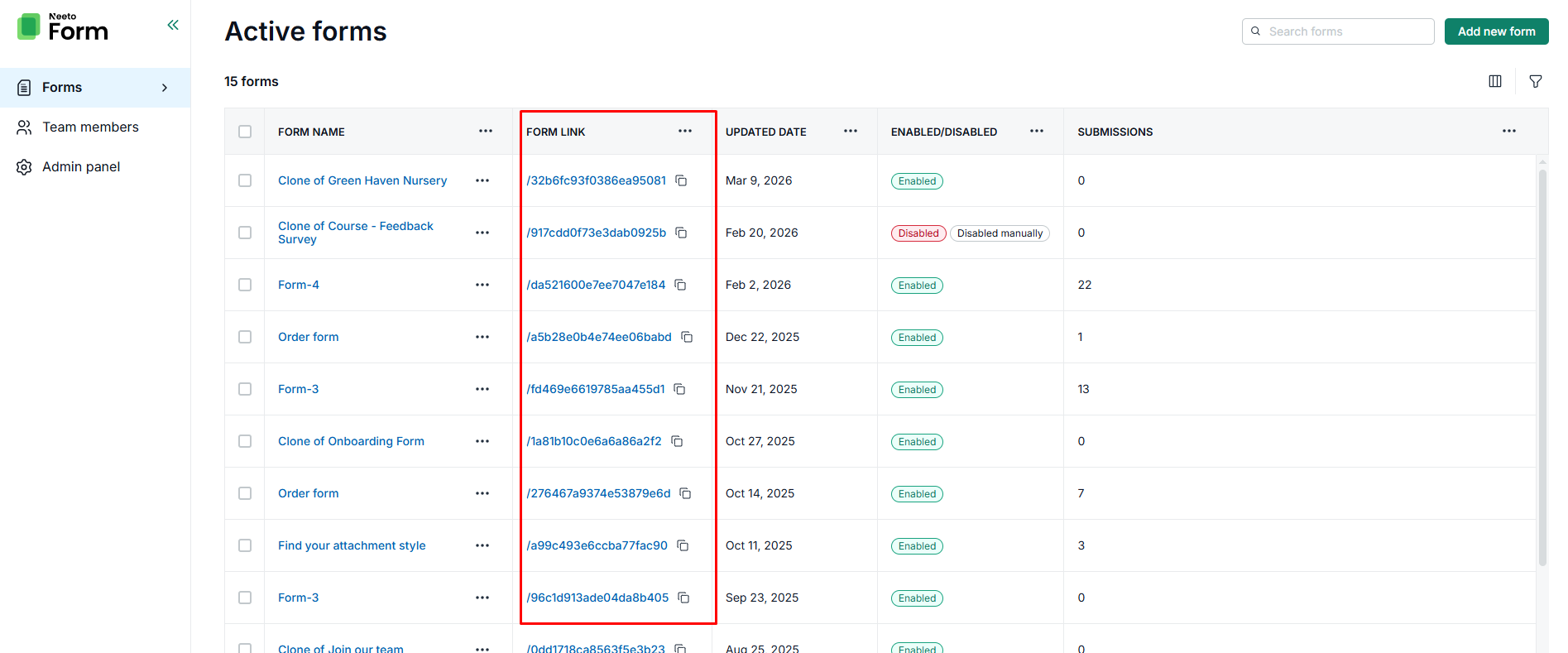
      <content type="html"><![CDATA[<p>Here are the highlights of what we shipped in February.</p><p></p><h2><strong>New Features &amp; Enhancements 🚀</strong> </h2><h4>Simplified webhook payloads</h4><p><a target="_blank" rel="noopener noreferrer nofollow" class="link" href="https://neetoformhelp.neetokb.com/p/a-6a52ca49">Webhook payloads</a> for file uploads and payments (Stripe, Razorpay, and manual UPI) are now cleaner and easier to parse.</p><p></p><ul class="bulletList"><li><p><strong>File uploads:</strong> Now return a simple <code>{ name, url }</code> array.</p></li><li><p><strong>Payments:</strong> Now return a flat <code>{ amount, transaction_id }</code> object.</p></li><li><p><strong>Product lists:</strong> Data structure has been flattened to reduce overhead for integrations like Make, n8n, or Zapier.</p></li></ul><h4>Campaign source tracking in embedded forms</h4><p>The UTM campaign source is now captured when a form is submitted via an <a target="_blank" rel="noopener noreferrer nofollow" class="link" href="https://neetoformhelp.neetokb.com/p/a-0ae27b26">embed</a>. If a visitor lands on a page through a marketing campaign (e.g., <code>?utm_source=newsletter</code>), the source is recorded with the submission to help attribute leads without external analytics.</p><h4>Form link column in forms list</h4><p>A "Link" column has been added to the forms listing page. It shows the URL slug with a one-click copy icon, making it faster to share forms without navigating to the "Share" tab.</p><p></p><div class="neeto-editor__image-wrapper neeto-editor__image--left neeto-editor__image--bordered"><figure><a href="https://assets-cdn.neetopublish.com/rails/active_storage/blobs/proxy/eyJfcmFpbHMiOnsiZGF0YSI6IjA1YjNmMTZiLTcwYTctNGQ4Ny04NTAwLWMyMTE2ODBjMjM4MSIsInB1ciI6ImJsb2JfaWQifX0=--3352294e439dee5a80565fa5fced0ec185d1b7ad/image.png" target="_blank" rel="noopener noreferrer" class="neeto-editor__image" style="height:300px;width:717px;display:inline-block;pointer-events:none;"><img id="m3i6b6" src="https://assets-cdn.neetopublish.com/rails/active_storage/blobs/proxy/eyJfcmFpbHMiOnsiZGF0YSI6IjA1YjNmMTZiLTcwYTctNGQ4Ny04NTAwLWMyMTE2ODBjMjM4MSIsInB1ciI6ImJsb2JfaWQifX0=--3352294e439dee5a80565fa5fced0ec185d1b7ad/image.png" alt="image" figheight="300" figwidth="717" align="left" border="true" draggable="false" contenteditable="false" data-border="true"></a><figcaption style="width:717px;"></figcaption></figure></div><p></p><h4>Filtered data exports</h4><p><a target="_blank" rel="noopener noreferrer nofollow" class="link" href="https://neetoformhelp.neetokb.com/p/a-95810793">Exported CSV or Excel files</a> now respect active filters. If submissions are filtered by date or status, the download will contain only those results, not the entire database.</p><h4>Field name standardization</h4><p>Several field names were updated for consistency:</p><ul class="bulletList"><li><p>"Multi choice" is now "Multiple choice"</p></li><li><p>"Terms &amp; Conditions" is now "Terms and conditions"</p></li><li><p>"Full name" is now "Name"</p></li></ul><h4>Dependent conditional logic</h4><p>Conditional logic now supports dependent rules. These rules are evaluated based on the results of other conditions within the form. Previously, each rule was evaluated independently. This update allows for multi-step logic chains, such as branching question trees and cascading scoring logic.</p><h4>Dynamic height enhancements</h4><p>Embedded forms now apply correct dynamic height behavior on 404 pages. Additionally, embedded customizations are preserved when a user resubmits a form.</p><h4>Product listing UI improvements</h4><p>The <a target="_blank" rel="noopener noreferrer nofollow" class="link" href="https://neetoformhelp.neetokb.com/p/a-ca873ad6">product listing</a> UI in <a target="_blank" rel="noopener noreferrer nofollow" class="link" href="https://neetoformhelp.neetokb.com/p/a-6235bc69">prefilled links</a> is more compact to reduce vertical scrolling. Product content is also more readable when a page background image is used.</p><p></p><h2><strong>Bug Fixes 🐛</strong></h2><h4>Conditional logic accuracy</h4><ul class="bulletList"><li><p>Fixed score calculations doubled when conditional rules were applied.</p></li><li><p>Resolved issues where rules based on hidden fields caused incorrect visibility or cleared pre-filled values.</p></li><li><p>Fixed a bug requiring the submit button to be clicked twice when number fields were populated via query parameters.</p></li></ul><h4>Payment integration reliability</h4><ul class="bulletList"><li><p>Resolved "Invalid State" errors when connecting Razorpay or Stripe.</p></li><li><p>Fixed a bug where reconnecting a payment provider hid previously saved details.</p></li><li><p>Ensured payment details appear correctly in automation emails.</p></li><li><p>Fixed visibility of notes added during manual payment confirmations.</p></li></ul><h4>Form transfer completeness </h4><p>Fixed an issue where transferring a form only moved the most recent submission. All historical submissions and payment records have been migrated during a transfer.</p><h4>Embed code isolation</h4><p>Fixed a priority issue where embed code snippets could expose metadata from other workspaces. Embed codes are now strictly isolated to their own workspace.</p><h4>Product description toggle</h4><p>Fixed a bug where disabling a product description did not clear the old text, causing stale information to appear on the form.</p><h4>Hidden field value restoration </h4><p>Ensured that fields hidden by logic correctly restore their pre-filled values when they become visible again.</p><h4>Generate link spinner</h4><p> Fixed a bug where the "Generate pre-filled link" button would spin indefinitely after adding single/multiple choice option.</p>]]></content>
    </entry><entry>
       <title><![CDATA[January 2026 updates - Ordered webhook payloads, bug fixes and more]]></title>
       <author><name>Sagar Anadkat</name></author>
      <link href="https://www.neeto.com/neetoform/blog/january-2026-updates"/>
      <updated>2026-01-31T18:30:00Z</updated>
      <id>https://www.neeto.com/neetoform/blog/january-2026-updates</id>
      <content type="html"><![CDATA[<p>Here are the highlights of what we shipped in January.</p><p></p><h2><strong>New Features &amp; Enhancements 🚀</strong> </h2><h4>Ordered webhook payloads</h4><p><a target="_blank" rel="noopener noreferrer nofollow" class="link" href="https://neetoformhelp.neetokb.com/p/a-6a52ca49">Webhook payloads</a> now follow the exact order of the questions defined in the form.</p><p>This ensures that your integrated applications receive data in a predictable, logical order every time. Whether you are mapping fields to Airtable or building complex workflows in <a target="_blank" rel="noopener noreferrer nofollow" class="link" href="http://Make.com">make.com</a> or n8n, you can now rely on a consistent data structure without the manual re-sorting.</p><h4>Optimized payload structure</h4><p>Matrix and address responses in <a target="_blank" rel="noopener noreferrer nofollow" class="link" href="https://neetoformhelp.neetokb.com/p/a-6a52ca49">webhook payloads</a> are now simplified for better performance.</p><h4>Increased the limit for the quantity selector</h4><p>The minimum and maximum limits for order quantities in the <a target="_blank" rel="noopener noreferrer nofollow" class="link" href="https://neetoformhelp.neetokb.com/p/a-ca873ad6">product list</a> field have been updated. The previous limit of 1,000 has been increased to 1,000,000. This change accommodates bulk orders for high-volume, low-cost items like industrial fasteners, stickers, and electrical components.</p><h4>Standardized empty field displays</h4><p>To improve clarity for non-required fields, email notifications sent to submitters now explicitly display "No response" for empty fields. Previously, these fields only displayed the question, which caused confusion.</p><h2><strong>Bug Fixes 🐛</strong></h2><h4>Payment processing</h4><p>Fixed an intermittent error that occurred when a submitter attempted a payment on the re-enabled form.</p><h4>Disabled form logic</h4><p>Fixed an issue where the reason for a disabled form was not displaying. The system now correctly indicates whether a form is inactive due to a submission limit or manual disablement.</p><h4>Mobile file uploads</h4><p>Resolved an issue where files uploaded via mobile browsers caused errors when viewed by admins on the submissions page.</p><h4>Email validation messages</h4><p>Updated the error message for invalid email entries to be clearer and more user-friendly.</p><h4>Analytics tracking</h4><p>Fixed a bug where <a target="_blank" rel="noopener noreferrer nofollow" class="link" href="https://help.neetoform.com/articles/insights">analytics</a> started tracking incorrectly on forms containing a phone number field.</p><h4>Country flag consistency</h4><p>Corrected a discrepancy where the country flag displayed differently from the one specified in pre-filled links.</p><h4>Submission limits and payments</h4><p>Fixed a logic error where forms with payment fields allowed submissions even after reaching the limit. New submissions are now correctly blocked, avoiding unnecessary automated refunds.</p><h4>Export formatting</h4><p>Removed raw HTML content from <a target="_blank" rel="noopener noreferrer nofollow" class="link" href="https://neetoformhelp.neetokb.com/p/a-95810793">csv and excel</a> exports for the terms &amp; conditions element. </p><h4>Query parameter validation</h4><p>Fixed inconsistent behavior and validation errors caused by duplicate query parameters for text, email, name, rating, number, and scale fields.</p>]]></content>
    </entry><entry>
       <title><![CDATA[December 2025 updates - country code based on location, expanded form responses passing for redirects]]></title>
       <author><name>Sagar Anadkat</name></author>
      <link href="https://www.neeto.com/neetoform/blog/december-2025-updates"/>
      <updated>2026-01-06T18:30:00Z</updated>
      <id>https://www.neeto.com/neetoform/blog/december-2025-updates</id>
      <content type="html"><![CDATA[<p>Here’s a complete overview of everything we shipped this month.</p><h2><strong>New Features &amp; Enhancements 🚀</strong> </h2><p></p><p><strong>Show country code based on the user's location </strong></p><p>Form creators no longer need to manually set a default country code. The country code now automatically defaults based on the user's browser location, providing a smooth experience for submitters.</p><p></p><p><strong>Expanded form responses passing for redirects </strong></p><p>NeetoForm now passes common fields such as text, phone numbers, and selections after form submission. Previously, only the name and email were passed. This allows for automatic pre-filling of responses when redirecting users to other pages, such as a booking page. </p><p></p><p><strong>Image-only paragraph fields</strong></p><p>The text requirement for paragraph fields has been removed. Forms can now be published with only an image in the paragraph field, which is useful when all necessary information is contained within an image.</p><p></p><p><strong>Calculated field support for product lists</strong></p><p>The calculated field now supports totaling values from product lists based on conditional logic actions.</p><p></p><p><strong>Email template enhancements</strong></p><p>Enhanced the visual styling and UI rendering for emails triggered by automation rules.</p><p></p><p><strong>Performance optimizations</strong></p><p>Conducted code refactoring and optimizations to resolve timeout errors and improve system stability.</p><h2><strong>Bug Fixes 🐛</strong></h2><p></p><p><strong>File upload validation</strong></p><p>Fixed an issue where forms could be submitted without a file even when the field was marked as "required."</p><p></p><p><strong>Field resets</strong></p><p>Resolved an edge case where the "Full Name" field failed to reset after configuration updates.</p><p></p><p><strong>Permission cleanup</strong></p><p>Removed duplicate permissions related to managing custom fields permissions.</p><p></p><p><strong>Embedded camera access</strong></p><p>Fixed a bug in embedded forms where the browser was not requesting camera permissions.</p><p></p><p><strong>Date formatting</strong></p><p>Corrected the submission date format to display as <code>MM/DD/YYYY</code> instead of <code>DD/MM/YYYY</code>.</p><p></p><p><strong>Analytics accuracy</strong></p><p> Fixed a timestamp issue where new submissions were not appearing in the "Last 24 hours" analytics filter.Fixes edge cases with creating date and full name responses.</p><p></p><p><strong>Unsaved changes modal</strong></p><p>Fixed an issue where an "unsaved changes" warning appeared incorrectly when enabling invite-only access.</p>]]></content>
    </entry><entry>
       <title><![CDATA[November 2025 - Pre filled form, dynamic variables first name & last name and more]]></title>
       <author><name>Sagar Anadkat</name></author>
      <link href="https://www.neeto.com/neetoform/blog/november-2025"/>
      <updated>2025-12-01T18:30:00Z</updated>
      <id>https://www.neeto.com/neetoform/blog/november-2025</id>
      <content type="html"><![CDATA[<div class="neeto-editor__image-wrapper neeto-editor__image--left neeto-editor__image--bordered"><figure><a href="https://assets-cdn.neetopublish.com/rails/active_storage/blobs/proxy/eyJfcmFpbHMiOnsiZGF0YSI6IjgzMWNhNzVjLTE0MWYtNGExMy1hMmRkLWU4NzM5MzJhMjBjOCIsInB1ciI6ImJsb2JfaWQifX0=--03c00fbca97c1fcd45d8b85496e28666621ec7c5/NeetoForm_HMy5W0USO.png" target="_blank" rel="noopener noreferrer" class="neeto-editor__image" style="height:376px;width:717px;display:inline-block;pointer-events:none;"><img src="https://assets-cdn.neetopublish.com/rails/active_storage/blobs/proxy/eyJfcmFpbHMiOnsiZGF0YSI6IjgzMWNhNzVjLTE0MWYtNGExMy1hMmRkLWU4NzM5MzJhMjBjOCIsInB1ciI6ImJsb2JfaWQifX0=--03c00fbca97c1fcd45d8b85496e28666621ec7c5/NeetoForm_HMy5W0USO.png" alt="NeetoForm_HMy5W0USO.png" figheight="376" figwidth="717" align="left" border="true" draggable="false" contenteditable="false" data-border="true"></a><figcaption style="width:717px;"></figcaption></figure></div><h2><strong>New Features &amp; Enhancements 🚀</strong> </h2><p></p><p><strong>Pre-filled form link</strong></p><p>Sometimes, you already know the submitter's name, email, phone number, etc. In such cases, NeetoForm can generate a <a target="_blank" rel="noopener noreferrer nofollow" class="link" href="https://neetoformhelp.neetokb.com/p/a-6235bc69">pre-filled</a> form link, so the submitter doesn't need to re-enter all that information.</p><p></p><p><strong>Dynamic variables for personalization</strong></p><p>Improved personalization by adding <a target="_blank" rel="noopener noreferrer nofollow" class="link" href="https://roadmap.neetoform.com/changelogs/pre-fill-form-fields">First Name and Last Name</a> as separate dynamic variables, in addition to the existing Full Name. </p><p></p><p><strong>Export submissions improvements</strong></p><p>Submission exports now include date and time and respect your profile timezone. For example, if your profile timezone is set to EST, all exported dates and times will be displayed in EST.</p><p></p><p><strong>Field code validation</strong></p><p>Implemented a character limit validation for the Field Code to prevent 400 error during pre-filled link generation.</p><p></p><p><strong>Numbered fields in conditional logic</strong></p><p>Conditional logic now supports comparisons using numbered fields, including fields from the form and calculated fields. This is useful for building quizzes or tests where points are assigned to answers. Logic can then be used to display a thank you page based on results, assign a grade, or redirect the user to a specific website based on their score.</p><p></p><p><strong>Automate refunds when payment is made after submission limit is reached</strong></p><p>Improved a flow where a submitter made a payment just as the submission limit was reached. The system will now automatically refund the submitter in such cases. Previously, this required a manual refund process.</p><p></p><p><strong>Progress bar logic refinement</strong></p><p>Edge cases related to the <a target="_blank" rel="noopener noreferrer nofollow" class="link" href="https://neetoformhelp.neetokb.com/p/a-e6c8f983">Progress Bar</a> when email verification is enabled are now considered.</p><p></p><p><strong>Optimized NeetoCal embedding</strong></p><p>When <a target="_blank" rel="noopener noreferrer nofollow" class="link" href="https://neetoformhelp.neetokb.com/p/a-a389e2eb">embedding NeetoCal </a>inside NeetoForm, a redundant iframe element was being rendered. This has been removed to avoid multiple iframes. </p><p></p><h2><strong>Bug Fixes 🐛</strong></h2><p></p><p><strong>Pre-filled feature bugs</strong></p><p>Resolved numerous bugs for the new pre-filled feature, covering multiple valid scenarios and edge cases.</p><p></p><p><strong>Mailchimp Integration</strong></p><p>Resolved "Something went wrong" error that was occurring during Mailchimp integration setup.</p><p></p><p><strong>Duplicate submission prevention</strong></p><p>Fixed an issue where duplicate submission prevention failed to work when the form was embedded.</p><p></p><p><strong>Inconsistency on 403 dashboard pages</strong></p><p>Resolved 403 error on the Forms Dashboard that prevented access to the Help &amp; Profile section. </p><p></p><p><strong>Transparency issue</strong></p><p>Fixed a UI transparency issue affecting the date and time dropdown menus.</p><p></p><p><strong>Form submission error</strong></p><p>Fixed an issue where form submission would fail with a "Form does not exist" error toastr if the custom link contained a forward slash (/).</p><p></p><p><strong>Missing payment details after transfer</strong></p><p>Payment details were missing from the submissions table after a form was transferred. This is now fixed.</p><p></p><p><strong>Custom email integration issue after transfer</strong></p><p>Fixed an issue where the custom email integration was not being removed after a form transfer.</p><p></p><p><strong>Incorrect analytics data</strong></p><p>Fixed an issue with incorrect analytics data displayed for <code>Last week</code> timestamp.</p><p></p><p><strong>Progress bar overlapping</strong></p><p>Fixed the Progress bar overlapping issue in smaller viewports.</p>]]></content>
    </entry><entry>
       <title><![CDATA[October 2025 - Progress bar, thank you page redesign, Outlook integration and more]]></title>
       <author><name>Sagar Anadkat</name></author>
      <link href="https://www.neeto.com/neetoform/blog/october-2025"/>
      <updated>2025-11-05T18:30:00Z</updated>
      <id>https://www.neeto.com/neetoform/blog/october-2025</id>
      <content type="html"><![CDATA[<h2><strong>New Features &amp; Enhancements 🚀</strong> </h2><p></p><p><strong>✅ </strong>Submitters can now see a <a target="_blank" rel="noopener noreferrer nofollow" class="link" href="https://help.neetoform.com/articles/progress-bar">progress bar</a> indicating how much of the form they have completed, providing a clear sense of their movement toward submission.</p><p></p><p><strong>✅ </strong>The Thank you page has been redesigned to more prominently highlight NeetoForm. </p><p></p><p><strong>✅ </strong>Users can now send emails to form submitters directly from their <a target="_blank" rel="noopener noreferrer nofollow" class="link" href="https://neetoformhelp.neetokb.com/p/a-c1e1085f">Outlook account</a>, ensuring consistent brand communication.</p><p></p><p><strong>✅ </strong>The submissions page now supports drag-to-resize on the sidebar, which helps view longer view names.</p><p></p><p><strong>✅ </strong>New options for inline and iframe embeds include: Dynamic Height, Hide Form Title, Transparent Background, and Left-Align Content. We've explained more about this <a target="_blank" rel="noopener noreferrer nofollow" class="link" href="https://neetoformhelp.neetopublish.com/p/take-control-of-your-forms-a-guide-to-neetoform-embed-customization">here</a>.</p><p></p><p><strong>✅ </strong>A new set of <a target="_blank" rel="noopener noreferrer nofollow" class="link" href="https://neetoform.com/neetoform/templates">thumbnails</a> for templates has been added, making it easier for users to find and select a template based on their use case.</p><p></p><h2><strong>Bug Fixes 🐛</strong></h2><p></p><p><strong>✅ </strong>An issue where an embedded form was not redirecting to an external link and returned an error has been fixed.</p><p></p><p><strong>✅ </strong>The unexpected change in Prefix select input width when the placeholder text was too long is resolved.</p><p></p><p><strong>✅ </strong>The issue where deleting an element after removing its title caused a 404 error is fixed.</p><p></p><p><strong>✅ </strong>The warning message was not hidden automatically when adding a UPI element to a new form. This is now corrected.</p><p></p><p><strong>✅ </strong>Conditional logic now works correctly when the form's language is set to non-English.</p><p></p><p><strong>✅ </strong>Resolved an issue where build preview would become horizontally scrollable if the product price exceeded a certain length.</p><p></p><p><strong>✅ </strong>The WhatsApp logo no longer incorrectly appears in place of the Mailchimp logo on the Manage Mailchimp page.</p><p></p><p><strong>✅ </strong>The date picker is now fully visible and no longer partially hidden in embedded forms.</p><p></p><p><strong>✅ </strong>The dynamic height option is now working correctly for iframe embeds.</p><p></p><p><strong>✅ </strong>Fixed an issue that prevented form embedding when access control was enabled.</p>]]></content>
    </entry><entry>
       <title><![CDATA[September 2025 updates - Product list, cloning of conditional logic and more]]></title>
       <author><name>Sagar Anadkat</name></author>
      <link href="https://www.neeto.com/neetoform/blog/september-2025-updates"/>
      <updated>2025-10-05T18:30:00Z</updated>
      <id>https://www.neeto.com/neetoform/blog/september-2025-updates</id>
      <content type="html"><![CDATA[<div class="neeto-editor__image-wrapper neeto-editor__image--left"><figure><a href="https://assets-cdn.neetopublish.com/rails/active_storage/blobs/proxy/eyJfcmFpbHMiOnsiZGF0YSI6IjBjMDE1YzYyLWYyNTAtNGQ2Yi04Zjk1LTQ4NTU2NzkyZTNjOCIsInB1ciI6ImJsb2JfaWQifX0=--31571858a03c20de4582a6f9a01fdd650b4712a9/image.png" target="_blank" rel="noopener noreferrer" class="neeto-editor__image" style="height:376px;width:717px;display:inline-block;pointer-events:none;"><img id="fybdd4" src="https://assets-cdn.neetopublish.com/rails/active_storage/blobs/proxy/eyJfcmFpbHMiOnsiZGF0YSI6IjBjMDE1YzYyLWYyNTAtNGQ2Yi04Zjk1LTQ4NTU2NzkyZTNjOCIsInB1ciI6ImJsb2JfaWQifX0=--31571858a03c20de4582a6f9a01fdd650b4712a9/image.png" alt="image" figheight="376" figwidth="717" align="left" draggable="false" contenteditable="false"></a><figcaption style="width:717px;"></figcaption></figure></div><h2><strong>New Features &amp; Enhancements 🚀</strong> </h2><p></p><p><strong>✅ </strong>Added product list element feature. Users can now create a product list directly within NeetoForm. Customers can select products, customize options, adjust quantities, and see the total cost. This helps small businesses automate their ordering process.</p><p></p><p><strong>✅ </strong>Added cloning of conditional logic. You can save time by cloning existing conditional logic instead of creating new ones from scratch. This is helpful when similar logic is needed across multiple fields.</p><p></p><p><strong>✅ </strong>For multiple-choice answers, "And" has been replaced with a comma in exported CSV and Excel files, making the data easier to use.</p><p></p><p><strong>✅ </strong>Automation rules now support conditions based on time records within a form.</p><p></p><p><strong>✅ </strong>Error messages are now more explicit when submitters enter only whitespace and submit the form.</p><h2><strong>Bug Fixes 🐛</strong></h2><p></p><p><strong>✅ </strong>The initial image size in the heading now correctly reflects the slider value without requiring user interaction.</p><p></p><p><strong>✅ </strong>The bug causing OTP login to fail with an "Invalid code" error has been fixed.</p><p></p><p><strong>✅&nbsp;</strong>Spacing issue fixed in Picture choice element.&nbsp;</p><p></p><p><strong>✅ </strong>Discrepancies between the preview and the end-user's view of the Thank You page have been resolved.</p><p></p><p><strong>✅ </strong>The missing connected tag after Google Tag Manager integration has been fixed.</p><p></p><p><strong>✅&nbsp;</strong>The inaccurate placeholder and error message for Google Analytics have been improved.</p><p></p><p><strong>✅ </strong>Resolved an issue where default values for number elements did not respect the Min/Max range before the form was published.</p><p></p><p><strong>✅ </strong>Fixed a formatting issue on the thank you page where the preview did not match the published version.</p><p></p><p><strong>✅ </strong>Fixed issue where calculated fields were not referenced in paragraph elements.</p><p></p><p><strong>✅ </strong>Elements are now selectable via clicks on the sides and corners.</p><p></p><p><strong>✅ </strong>The default value in a number field now updates correctly after enabling "Allow Decimals" or "Allow Negative Values."</p><p></p><p><strong>✅ </strong>Fixed a country code mismatch between the preview and published versions in the phone number element. </p><p></p><p><strong>✅</strong>Deleted options no longer appear in conditional logic.</p><p></p><p><strong>✅ </strong>The thank you page image is now centered in the EUI, matching the preview.</p><p></p><p><strong>✅</strong>Resolved a scrollbar issue on the thank you page. </p>]]></content>
    </entry><entry>
       <title><![CDATA[Take control of your forms: A guide to NeetoForm embed customization]]></title>
       <author><name>Praveen Murali</name></author>
      <link href="https://www.neeto.com/neetoform/blog/take-control-of-your-forms-a-guide-to-neetoform-embed-customization"/>
      <updated>2025-09-23T17:29:13Z</updated>
      <id>https://www.neeto.com/neetoform/blog/take-control-of-your-forms-a-guide-to-neetoform-embed-customization</id>
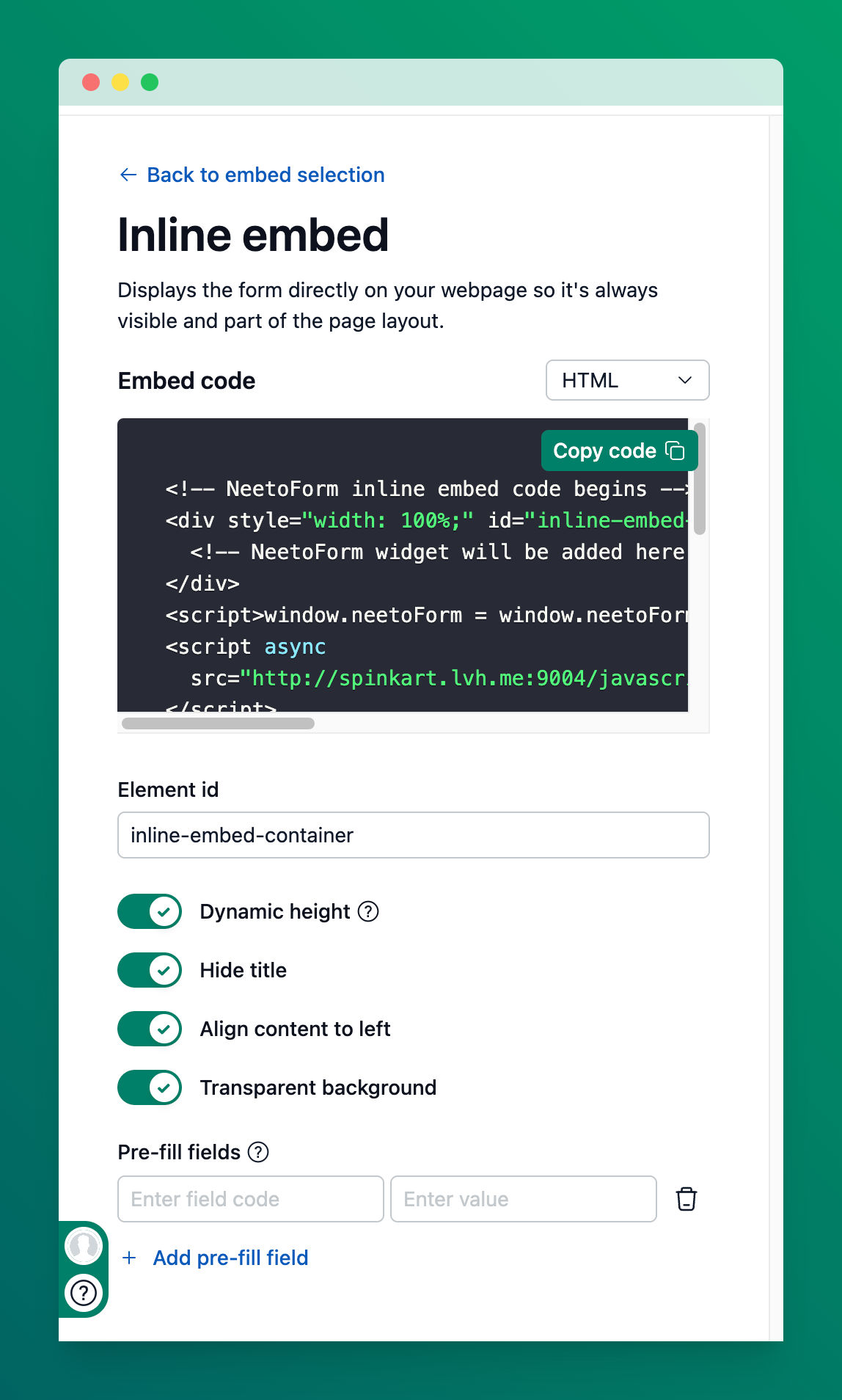
      <content type="html"><![CDATA[<p>Your website is a reflection of your brand, so why should your forms be any different? With NeetoForm's new customization options, you can now embed forms that seamlessly match your site's design and layout. This post will show you how to make your forms not just functional, but an integrated part of your website’s visual design. We'll dive into the available options for inline embeds, assuming you're already familiar with the basic embedding process outlined in our <a target="_blank" rel="noopener noreferrer nofollow" class="link" href="https://neetoformhelp.neetokb.com/articles/how-to-embed-in-a-webpage">main embed article</a>.</p><h3>Why customize your embeds?</h3><p>Without customization, embedded forms can sometimes feel out of place:</p><ul class="bulletList"><li><p>Fixed height with an internal scrollbar</p></li><li><p>Extra padding that doesn’t match your layout</p></li><li><p>Default titles that duplicate your page headings</p></li></ul><p>Our new customization options solve these issues, giving you full control over your form’s appearance so it looks polished and professional.</p><h3>Customization options</h3><p>Simply toggle the switch to the "On" position to enable the feature. The embed code on the top will automatically update in real-time. </p><div class="neeto-editor__image-wrapper neeto-editor__image--left"><figure><a href="https://assets-cdn.neetopublish.com/rails/active_storage/blobs/proxy/eyJfcmFpbHMiOnsiZGF0YSI6ImZlODQxZGU3LTJmMzYtNGMwMC1iZmI2LWY5MjVkY2YwYjdiYyIsInB1ciI6ImJsb2JfaWQifX0=--c5aea7bb4e72f75987ace01b3651ebd9405d2fbf/pawelzmarlak-2025-09-23T08_52_12.438Z_97iz3UFaE.png" target="_blank" rel="noopener noreferrer" class="neeto-editor__image" style="height:auto;width:500px;display:inline-block;pointer-events:none;"><img src="https://assets-cdn.neetopublish.com/rails/active_storage/blobs/proxy/eyJfcmFpbHMiOnsiZGF0YSI6ImZlODQxZGU3LTJmMzYtNGMwMC1iZmI2LWY5MjVkY2YwYjdiYyIsInB1ciI6ImJsb2JfaWQifX0=--c5aea7bb4e72f75987ace01b3651ebd9405d2fbf/pawelzmarlak-2025-09-23T08_52_12.438Z_97iz3UFaE.png" alt="pawelzmarlak-2025-09-23T08_52_12.438Z_97iz3UFaE.png" figheight="auto" figwidth="500" align="left" draggable="false" contenteditable="false"></a><figcaption style="width:500px;"></figcaption></figure></div><p>Here’s what each option does and why it matters:</p><h4><strong>Dynamic height</strong></h4><ul class="bulletList"><li><p><strong>What it does:</strong> Automatically adjusts the form’s height to fit its content, eliminating internal scrollbars.</p></li><li><p><strong>Why it’s great:</strong> Visitors get a smoother experience, and the form feels like a natural part of the page rather than a fixed-size box.</p></li></ul><h4><strong>Hide title</strong></h4><ul class="bulletList"><li><p><strong>What it does:</strong> Removes the default form title from the top of the embed.</p></li><li><p><strong>Why it’s great:</strong> Prevents redundant headings if your page already has its own title, keeping your design clean.</p></li></ul><h4><strong>Align content to left</strong></h4><ul class="bulletList"><li><p><strong>What it does:</strong> Removes internal padding from around the form fields, aligning them with the left edge of the embed container.</p></li><li><p><strong>Why it’s great:</strong> Perfect for modern, minimalist layouts; allows your form to fit your page’s grid for a cohesive look.</p></li></ul><h4><strong>Transparent background</strong></h4><ul class="bulletList"><li><p><strong>What it does:</strong> Makes the embed background transparent so your page’s background color, image, or pattern shows through.</p></li><li><p><strong>Why it’s great:</strong> Creates a seamless, professional appearance, making the form feel integrated rather than boxed.</p></li></ul><h3>How to embed your customized form</h3><p>Once you’ve tailored your form:</p><ol class="orderedList"><li><p>Click the <strong>Copy</strong> button to get the updated embed code.</p></li><li><p>Paste the code into the HTML of your webpage where you want the form to appear.</p></li></ol><p>That’s it! Your form now looks professional, aligns with your page layout, and provides a smooth, user-friendly experience.</p><h3>The difference customization makes: Before and After</h3><p>See how these new features transform a standard form embed into a seamless part of a webpage.</p><h5><br>Before</h5><div class="neeto-editor__image-wrapper neeto-editor__image--left"><figure><a href="https://assets-cdn.neetopublish.com/rails/active_storage/blobs/proxy/eyJfcmFpbHMiOnsiZGF0YSI6ImMzMGJlMzYxLTlhOGYtNGI5Zi1hZDQ5LWExZjYxNjAzNDc0MCIsInB1ciI6ImJsb2JfaWQifX0=--fb9655bb8b20bfe5c59a6694774162b7c57abf3c/Before_U5zprucNYC.png" target="_blank" rel="noopener noreferrer" class="neeto-editor__image" style="height:1163px;width:717px;display:inline-block;pointer-events:none;"><img src="https://assets-cdn.neetopublish.com/rails/active_storage/blobs/proxy/eyJfcmFpbHMiOnsiZGF0YSI6ImMzMGJlMzYxLTlhOGYtNGI5Zi1hZDQ5LWExZjYxNjAzNDc0MCIsInB1ciI6ImJsb2JfaWQifX0=--fb9655bb8b20bfe5c59a6694774162b7c57abf3c/Before_U5zprucNYC.png" alt="Before_U5zprucNYC.png" figheight="1163" figwidth="717" align="left" draggable="false" contenteditable="false"></a><figcaption style="width:717px;"></figcaption></figure></div><h5>After</h5><div class="neeto-editor__image-wrapper neeto-editor__image--left"><figure><a href="https://assets-cdn.neetopublish.com/rails/active_storage/blobs/proxy/eyJfcmFpbHMiOnsiZGF0YSI6IjI4ZjE5MjY3LWU2MTMtNDc1ZC1iYjllLWVjMmUzYzdmODU2YSIsInB1ciI6ImJsb2JfaWQifX0=--4d3728cca01fa8a2139f3b227943c9935d2f9ab9/After_2LlpV_3AH.png" target="_blank" rel="noopener noreferrer" class="neeto-editor__image" style="height:1303px;width:717px;display:inline-block;pointer-events:none;"><img src="https://assets-cdn.neetopublish.com/rails/active_storage/blobs/proxy/eyJfcmFpbHMiOnsiZGF0YSI6IjI4ZjE5MjY3LWU2MTMtNDc1ZC1iYjllLWVjMmUzYzdmODU2YSIsInB1ciI6ImJsb2JfaWQifX0=--4d3728cca01fa8a2139f3b227943c9935d2f9ab9/After_2LlpV_3AH.png" alt="After_2LlpV_3AH.png" figheight="1303" figwidth="717" align="left" draggable="false" contenteditable="false"></a><figcaption style="width:717px;"></figcaption></figure></div>]]></content>
    </entry><entry>
       <title><![CDATA[August 2025 updates - Picture choices, embed Neetocal booking page and more]]></title>
       <author><name>Sagar Anadkat</name></author>
      <link href="https://www.neeto.com/neetoform/blog/august-2025-updates"/>
      <updated>2025-09-02T18:30:00Z</updated>
      <id>https://www.neeto.com/neetoform/blog/august-2025-updates</id>
      <content type="html"><![CDATA[<div class="neeto-editor__image-wrapper neeto-editor__image--left"><figure><a href="https://assets-cdn.neetopublish.com/rails/active_storage/blobs/proxy/eyJfcmFpbHMiOnsiZGF0YSI6IjhmNDE5MDY1LWFmMTMtNDRhNi1hNDA5LWI0NmY1NTU3NDRhMyIsInB1ciI6ImJsb2JfaWQifX0=--6027a85a7660b22db7864dca44e5b8999fe06792/image.png" target="_blank" rel="noopener noreferrer" class="neeto-editor__image" style="height:404px;width:717px;display:inline-block;pointer-events:none;"><img id="6yip52" src="https://assets-cdn.neetopublish.com/rails/active_storage/blobs/proxy/eyJfcmFpbHMiOnsiZGF0YSI6IjhmNDE5MDY1LWFmMTMtNDRhNi1hNDA5LWI0NmY1NTU3NDRhMyIsInB1ciI6ImJsb2JfaWQifX0=--6027a85a7660b22db7864dca44e5b8999fe06792/image.png" alt="image" figheight="404" figwidth="717" align="left" draggable="false" contenteditable="false"></a><figcaption style="width:717px;"></figcaption></figure></div><p>Here’s what we got done in August 2025 in NeetoForm.</p><h2><strong>Features &amp; Enhancements </strong><span data-emoji="" class="neeto-editor-emoji" data-label="✨">✨</span></h2><h4>✅ Picture choices</h4><p>You can now add pictures to options, providing users with a more visual way to make their selections.</p><h4><strong>✅ </strong>Embed NeetoCal Booking Page</h4><p>You can now embed your NeetoCal booking page directly into your form. This means users can schedule appointments without leaving the form.</p><h4><strong>✅ </strong>Send emails from your domain</h4><p>Added DKIM and DMARC support, so you can now send emails to your form submitters from your domain.</p><h4><strong>✅ </strong>Customize submissions table</h4><p>Reorder the columns in your submissions table to display information in your preferred order.</p><h4><strong>✅ </strong>Improved banner placement</h4><p>You now have more options for where to place banners on your forms, including above the welcome element.</p><h2><strong>Bug Fixes 🐛</strong></h2><p></p><p><strong>✅  </strong>Fixed discrepancy between submitted date &amp; displayed date on submission page.</p><p></p><p><strong>✅ </strong>Fixed an issue where some data was missed in Google Sheets when a submission limit was set.</p><p></p><p><strong>✅ </strong>The country flag for Cocos Island now displays correctly in submissions.</p><p></p><p><strong>✅ </strong>Fixed the issue related to duplicate Razorpay payments with the same identifier in submissions.</p><p></p><p><strong>✅ </strong>The negative count that appeared after deleting all submissions has been fixed.</p><p></p><p>✅ Fixed an issue where successful submissions with a payment ID were not appearing in the submissions tab when a submission limit was set.</p><p></p><p>✅ Resolved a bug that caused valid dates to trigger an "out of range" error and display in the wrong format.</p><p></p><p>✅ Corrected incorrect data displayed when filtering for "Last Month" in the analytics view.</p><p></p><p>✅ Fixed a bug related to the custom trigger for pop-up embeds.</p><p></p><p>✅ Fixed the incorrect page title for Webhooks.</p>]]></content>
    </entry><entry>
       <title><![CDATA[July 2025 updates -Custom domain, faster search and more]]></title>
       <author><name>Sagar Anadkat</name></author>
      <link href="https://www.neeto.com/neetoform/blog/july-2025-updates-custom-domain-faster-search-and-more"/>
      <updated>2025-08-04T18:30:00Z</updated>
      <id>https://www.neeto.com/neetoform/blog/july-2025-updates-custom-domain-faster-search-and-more</id>
      <content type="html"><![CDATA[<p>Let's go through what we got done in July 2025 in NeetoForm.</p><h2><strong>Features </strong><span data-emoji="" class="neeto-editor-emoji" data-label="✨">✨</span> </h2><h4><strong>✅ </strong>Gmail integration</h4><p>By default, all NeetoForm emails are sent from <a target="_blank" rel="noopener noreferrer nofollow" class="link" href="mailto:neetoform.outbound@neeto.com">neetoform.outbound@neeto.com</a>. Now, you can maintain brand consistency by sending emails directly from your own <a rel="noopener noreferrer nofollow" class="link" href="https://roadmap.neetoform.com/changelogs/gmail-integration-to-send-emails">Gmail account</a>.</p><h2><strong>Enhancements </strong><span data-emoji="" class="neeto-editor-emoji" data-label="✨">✨</span> </h2><h4><strong>✅ </strong>Faster search</h4><p>We've fine-tuned our search, so you'll now get relevant results much quicker.</p><h4><strong>✅ </strong>Refactored code</h4><p>Simplified the form structure by grouping related functions together for better performance.</p><h4><strong>✅ </strong>Collect full names</h4><p>You can now use "Full name" instead of "First name" and "Last name," enabling you to collect complete names.  </p><h4><strong>✅ </strong>Improved Google Sheets integration</h4><p>We've optimized Google Sheets integration for better performance. This means fewer API requests and faster processing times for you.</p><h4><strong>✅ </strong>QR codes with payment amount embedded</h4><p>For manual UPI QR code scans, the payment amount is now embedded. This reduces errors and saves you manual work, as submitters can no longer type in any amount.</p><h4><strong>✅ </strong>Update Custom Fields with Automation Rules</h4><p>You can now use automation rules to update custom field values, saving time and automating repetitive tasks.</p><h2><strong>Bug Fixes 🐛</strong></h2><h4><strong>✅ </strong>UPI disconnect display fix</h4><p>Resolved an issue where the user interface wasn't updating correctly after disconnecting UPI.</p><h4><strong>✅ </strong>Fixed Google Sheets integration race condition</h4><p>Fixed a race condition in Google Sheets integration where opening two forms simultaneously in different tabs caused a "Form has already been taken" error.</p><h4><strong>✅ </strong>Fixed page crash</h4><p>Prevented page crashes due to duplicate query keys used for prefilling form responses.</p><h4><strong>✅ </strong>Column resizing lag</h4><p>The lag experienced when resizing columns, especially with many columns, has been resolved. We are still working on optimizing it further.</p><h4><strong>✅ </strong>Submission search by time</h4><p>Fixed the bug that affected searching submissions based on time responses.</p><h4><strong>✅ </strong>Clearer terms &amp; conditions error</h4><p>The error message displayed when the terms and conditions description was removed is now clearer.</p><h4><strong>✅ </strong>HTML entities in banners</h4><p>HTML entities (&lt;,&gt;,&amp;,",',©)are now displaying correctly in banners.</p>]]></content>
    </entry><entry>
       <title><![CDATA[Milestone M39 - More powerful send to API action, UPI payments, Banner element, Google Tag Manager integration and more]]></title>
       <author><name>Chirag Shah</name></author>
      <link href="https://www.neeto.com/neetoform/blog/milestone-m39"/>
      <updated>2025-07-01T12:02:11Z</updated>
      <id>https://www.neeto.com/neetoform/blog/milestone-m39</id>
      <content type="html"><![CDATA[<p>Let's go through what we got done in Milestone M39 (Jun 16 - Jun 29).</p><p></p><h3>🤩 Features</h3><ul><li><p>Enhancements to send to API action - You can now create your own payload and include headers for sending the submission related data to any external endpoint.</p></li><li><p>Your forms can now accept UPI payments.</p></li><li><p>New banner element introduced to show announcements/warnings to your users.</p></li><li><p>Added support for Google Tag Manager.</p></li></ul><h3>🚀 Enhancements</h3><ul><li><p>Date time element now supports date time, just date and just time option.</p></li><li><p>Added support for terms and conditions in automation rules and conditional logic.</p></li><li><p>The options in conditional logic form are now grouped by category in the dropdowns.</p></li><li><p>UI Enhancements to automation rules.</p></li><li><p>Support for resizing image in Welcome Screen and Heading element.</p></li></ul><h3>🐛 Bug Fixes</h3><ul><li><p>Fixed issues with exporting submission data to Google Sheets when records are reordered after deleting 'submitted_at' column from the Google sheet.</p></li><li><p>Fixed issues with filtering submissions by terms and condition responses.</p></li><li><p>Fixed styling issues with inline embeds.</p></li><li><p>Fixed issues with editing automation rules</p></li><li><p>Fixed UI bug for country selection in payment details (Windows).</p></li><li><p>Fixed issues with handling existing query params in embeds and redirect URLs</p></li><li><p>Fixed text visibility issue on closed embed view.</p></li></ul>]]></content>
    </entry><entry>
       <title><![CDATA[Milestone M38 - Move forms to another workspace, easy label edits and more]]></title>
       <author><name>Chirag Shah</name></author>
      <link href="https://www.neeto.com/neetoform/blog/milestone-m38"/>
      <updated>2025-06-16T19:12:42Z</updated>
      <id>https://www.neeto.com/neetoform/blog/milestone-m38</id>
      <content type="html"><![CDATA[<p>Let's go through what we got done in Milestone M38 (Jun 02 - Jun 15).</p><p></p><h3>🤩 Features</h3><ul><li><p>You can now move forms to another workspace.</p></li></ul><h3>🚀 Enhancements</h3><ul><li><p>When adding a new element, the label gets selected by default for easy edit.</p></li></ul><h3>🐛 Bug Fixes</h3><ul><li><p>Fixed issues with configuring Mailchimp field mappings.</p></li><li><p>Fixed 404 error page being shown instead of 403 when trying to access invite via email page.</p></li><li><p>Fix issues with performing actions on all forms in a particular view.</p></li><li><p>Added missing validation when removing required message field for thank you page.</p></li><li><p>Fixed send test email.</p></li><li><p>Fixed URL for manage notifications.</p><p></p><p></p></li></ul>]]></content>
    </entry><entry>
       <title><![CDATA[Milestone M37 - Workspace level webhooks, redirect URL with query params and more]]></title>
       <author><name>Chirag Shah</name></author>
      <link href="https://www.neeto.com/neetoform/blog/milestone-m37"/>
      <updated>2025-06-03T05:57:03Z</updated>
      <id>https://www.neeto.com/neetoform/blog/milestone-m37</id>
      <content type="html"><![CDATA[<p>Let's go through what we got done in Milestone M37 (May 19 - Jun 01).</p><p></p><h4>🚀 Enhancements</h4><ul><li><p>Support webhooks at workspace level.</p></li><li><p>Support passing query parameters to the redirect URL.</p></li><li><p>Support to enable both - a response limit and close date for a form. Previously only one could be enabled at a time.</p></li><li><p>Added support for filtering using terms and conditions on submissions page.</p></li></ul><h4>🧹 Code Cleanup &amp; Maintenance</h4><ul><li><p>Performance improvements on submissions page.</p></li><li><p>Removed unused code related to suffixes.</p></li></ul><h4>🐛 Bug Fixes</h4><ul><li><p>Fixed the issue with the Stripe integration redirect URL.</p></li><li><p>Submissions are now deleted in the background to prevent timeout issues.</p></li><li><p>Fixed issues with deleting thank you configurations.</p></li><li><p>Fixed HTML entity being rendered in description fields.</p></li><li><p>Enhancements to captcha element to reduce the number of issues.</p></li><li><p>Fixed custom message not being displayed correctly for closed forms.</p></li><li><p>Fixed "send email to form submitter" being disabled on publishing an update in form.</p></li><li><p>Fixed issues where partial submission data was not cleared from local storage.</p></li><li><p>Handled edge cases in preventing duplicate submissions.</p></li><li><p>Fixed multiple loaders being shown on opening embedded form.</p></li></ul>]]></content>
    </entry><entry>
       <title><![CDATA[Milestone M36 - Performance improvements and enhanced invitation flow]]></title>
       <author><name>Abilash Sajeev</name></author>
      <link href="https://www.neeto.com/neetoform/blog/milestone-m36-updates"/>
      <updated>2025-05-22T07:19:04Z</updated>
      <id>https://www.neeto.com/neetoform/blog/milestone-m36-updates</id>
      <content type="html"><![CDATA[<p>Let's go through what we got done in Milestone M36 (May 05 - May 18).</p><h4>🚀 Enhancements</h4><ul><li><p>Improved application performance by optimizing slow transactions and database operations.</p></li><li><p>Enhanced invitation capabilities, allowing more users to be invited directly from the invitations pane.</p></li><li><p>Improved post-submission redirects to optionally pass submitted data as URL query parameters.</p></li></ul><h4>🧹 Code Cleanup &amp; Maintenance</h4><ul><li><p>Removed unused and legacy code to reduce technical debt and improve maintainability.</p></li></ul><h4>🐛 Bug Fixes</h4><ul><li><p>Fixed issue where embedded forms wouldn’t open the first time in the preview shown during configuration.</p></li><li><p>Resolved issues related to filtering submissions based on custom date field responses.</p></li><li><p>Addressed issues with bulk deletion of submissions that occasionally caused timeout errors.</p></li></ul>]]></content>
    </entry><entry>
       <title><![CDATA[Milestone M35 - Linkified phone numbers and better visibility for email notifications settings]]></title>
       <author><name>Chirag Shah</name></author>
      <link href="https://www.neeto.com/neetoform/blog/milestone-m35"/>
      <updated>2025-05-05T13:21:21Z</updated>
      <id>https://www.neeto.com/neetoform/blog/milestone-m35</id>
      <content type="html"><![CDATA[<p>Let's go through what we got done in Milestone M35 (Apr 21 - May 04).</p><h4>Enhancements</h4><ul><li><p>Linkified phone number responses and added copy icon next to both email and phone number responses.</p></li><li><p>Added separate cards for email notifications instead of it being nested inside a notifications card in settings.</p></li></ul><h4>Bug fixes</h4><ul><li><p>Fixed issues in exporting submission details when rows are hidden by filters in Google Sheet.</p></li><li><p>Fixed issues related to storing responses for terms and conditions.</p></li></ul><ul><li><p>Fixed examples for embedding NeetoForm in a React and NextJS application.</p></li></ul>]]></content>
    </entry><entry>
       <title><![CDATA[Milestone M34 - better Google Sheet integration and more]]></title>
       <author><name>Chirag Shah</name></author>
      <link href="https://www.neeto.com/neetoform/blog/milestone-m34-updates"/>
      <updated>2025-04-21T09:17:03Z</updated>
      <id>https://www.neeto.com/neetoform/blog/milestone-m34-updates</id>
      <content type="html"><![CDATA[<p>Let's go through what we got done in Milestone M34 (Apr 07 - Apr 20).</p><h4>Enhancements</h4><ul><li><p>Google Sheets integration has been revamped to support updates without losing existing state, re-ordering and formatting related options.</p></li></ul><h4>Bug fixes</h4><ul><li><p>Fixed issues with the payment amount with decimals.</p></li><li><p>Fixed issues with the payment amount rounding incorrectly.</p></li><li><p>Updated the fee validation error message.</p></li><li><p>Fixed CSS related email styling fixes.</p></li></ul>]]></content>
    </entry><entry>
       <title><![CDATA[Milestone M33 - email verification via OTP, pre-filled embedded forms and more]]></title>
       <author><name>Chirag Shah</name></author>
      <link href="https://www.neeto.com/neetoform/blog/milestone-m33-updates"/>
      <updated>2025-04-07T04:56:19Z</updated>
      <id>https://www.neeto.com/neetoform/blog/milestone-m33-updates</id>
      <content type="html"><![CDATA[<p>Let's go through what we got done in Milestone M33 (Mar 24 - Apr 06).</p><h4>Enhancements</h4><ul><li><p>The email field now supports <a rel="noopener noreferrer nofollow" class="link" href="https://help.neetoform.com/articles/email-verification-via-otp">verification via OTP</a> <span style="background-color: rgb(255, 255, 255)">to prevent spam and stop respondents from entering random emails to fill out forms.</span></p></li><li><p>Added support for <a rel="noopener noreferrer nofollow" class="link" href="https://help.neetoform.com/articles/how-to-embed-in-a-webpage#pre-filled-embedded-forms">pre-filling embedded forms</a>.</p></li><li><p>Added an error page for unauthorized errors in public pages. Previously it was showing a 404 page.</p></li></ul><h4>Bug Fixes</h4><ul><li><p>Fixed issues with duplicate submissions and email verification.</p></li><li><p>Fixed issues caused by incorrect payloads during form building.</p></li><li><p>Fixed bugs related to filtering out dropdown options based on user input.</p></li><li><p>Fixed an issue where date picker was rendered behind the pane.</p></li></ul>]]></content>
    </entry><entry>
       <title><![CDATA[Milestone M32 - granular permission, layout fixes and more]]></title>
       <author><name>Chirag Shah</name></author>
      <link href="https://www.neeto.com/neetoform/blog/milestone-m32-updates"/>
      <updated>2025-03-25T06:26:24Z</updated>
      <id>https://www.neeto.com/neetoform/blog/milestone-m32-updates</id>
      <content type="html"><![CDATA[<p>Let's go through what we got done in Milestone M32 (Mar 10 - Mar 23).</p><h4>Enhancements</h4><ul><li><p>NeetoForm now supports having more granular permissions for your user roles.</p></li></ul><h4>Bug fixes</h4><ul><li><p>Fixes issues with rendering "&lt;" character in labels.</p></li><li><p>Fixed the layout inconsistencies on various pages.</p></li><li><p>Fixes issues in viewing thank you configuration when user doesn't have access to manage unique submissions.</p></li><li><p>Fixed the layout issues on the Google Sheets, Mailchimp, and Whatsapp integration pages.</p></li></ul>]]></content>
    </entry><entry>
       <title><![CDATA[Milestone M31  - conditional logic cloning, page crashes fix and more]]></title>
       <author><name>Chirag Shah</name></author>
      <link href="https://www.neeto.com/neetoform/blog/milestone-m31-updates"/>
      <updated>2025-03-10T13:20:09Z</updated>
      <id>https://www.neeto.com/neetoform/blog/milestone-m31-updates</id>
      <content type="html"><![CDATA[<p>Let's go through what we got done in Milestone M31 (Feb 24 - Mar 09).</p><h4>Enhancements</h4><ul><li><p>Adds support for cloning conditional logic while cloning forms.</p></li></ul><h4>Bug fixes</h4><ul><li><p>Skipped rendering Stripe Elements when the form doesn't have any Stripe element.</p></li><li><p>Handled the cases where the synced Google sheet is deleted by user.</p></li><li><p>Fixed page crashes related to Stripe in draft previews.</p></li><li><p>Fixed issues with pressing back button on thank you page after successful payment.</p></li><li><p>Fixed page crashes while accessing form settings.</p></li></ul>]]></content>
    </entry><entry>
       <title><![CDATA[Milestone M30 - retry logic for authorization, country code bug fix and more]]></title>
       <author><name>Chirag Shah</name></author>
      <link href="https://www.neeto.com/neetoform/blog/milestone-m30-updates"/>
      <updated>2025-02-24T20:38:17Z</updated>
      <id>https://www.neeto.com/neetoform/blog/milestone-m30-updates</id>
      <content type="html"><![CDATA[<p>Let's go through what we got done in Milestone M30 (Feb 10 - Feb 23).</p><h4>Enhancements</h4><ul><li><p>Added retry logic for authorization errors for Google Sheets integration.</p></li><li><p>Skipped cloning email notifications while cloning form.</p></li><li><p>Removed stale attachments and fixed image attachments for heading entities.</p></li><li><p>Handled post-submission jobs gracefully when form is soft deleted.</p></li></ul><h4>Bug fixes</h4><ul><li><p>Fixed page crashes while accessing closed forms.</p></li><li><p>Fixed issues with automation rule matching for custom date fields.</p></li><li><p>Fixed authorization related bug for Zapier integration.</p></li><li><p>Prevented users with read-only access from managing fields and field values.</p></li><li><p>Fixed a bug where country code for phone number element was not showing up in iOS.</p></li></ul>]]></content>
    </entry><entry>
       <title><![CDATA[Milestone M29 - collect tax, analytics, form deletion and more]]></title>
       <author><name>Chirag Shah</name></author>
      <link href="https://www.neeto.com/neetoform/blog/milestone-m29-updates"/>
      <updated>2025-02-10T16:41:49Z</updated>
      <id>https://www.neeto.com/neetoform/blog/milestone-m29-updates</id>
      <content type="html"><![CDATA[<p>Let's go through what we got done in Milestone M29 (Jan 27 - Feb 09).</p><h4>Enhancements</h4><ul><li><p>The payment element now has the <a rel="noopener noreferrer nofollow" class="link" href="https://neetoformhelp.neetokb.com/p/a-e0d75c6b">ability to apply tax</a>.</p></li><li><p>Forms now support conditionally skipping payments during submission.</p></li><li><p>Notify form creators when the access token for Google Sheets integration is revoked.</p></li><li><p>The UI now uses custom domain-based URLs, including emails.</p></li><li><p>Insights has been renamed to Analytics.</p></li></ul><h4>Bug fixes</h4><ul><li><p>Post-submission jobs are now handled gracefully when the form is deleted.</p></li><li><p>A few permission-related issues have been fixed.</p></li><li><p>A page crash while reloading the themes page in specific cases has been fixed.</p></li><li><p>An edge case has been handled with a unique submission option along with a resubmit link on the thank you pages.</p></li></ul>]]></content>
    </entry>
    </feed>