<?xml version="1.0" encoding="utf-8"?>
    <feed xmlns="http://www.w3.org/2005/Atom">
     <title>NeetoRecord Blog</title>
     <link href="https://www.neeto.com/neetorecord/blog/feed.xml" rel="self"/>
     <link href="https://www.neeto.com/neetorecord/blog"/>
     <updated>2026-06-04T01:10:42Z</updated>
     <id>https://www.neeto.com/neetorecord/blog</id>
     <entry>
       <title><![CDATA[NeetoRecord Desktop app changelog]]></title>
       <author><name>Farhan ck</name></author>
      <link href="https://www.neeto.com/neetorecord/blog/desktop-app-changelog"/>
      <updated>2026-05-19T18:30:00Z</updated>
      <id>https://www.neeto.com/neetorecord/blog/desktop-app-changelog</id>
      <content type="html"><![CDATA[<p>This page lists all the changes to the <a target="_blank" rel="noopener noreferrer nofollow" class="link" href="https://www.neeto.com/neetorecord/download">NeetoRecord Desktop app</a>. </p><h3>1.18.5</h3><p><em>25 May 2026</em></p><ul class="bulletList"><li><p>Updated copyright info.</p></li><li><p>Fixed an issue related to pending uploads.</p></li><li><p>Introduced caching to increase autoupdating speed.</p></li></ul><h3>1.18.4</h3><p><em>20 May 2026</em></p><ul class="bulletList"><li><p>Added an option to skip the countdown.</p></li><li><p>Added Quit and Reset options to the main window on Linux.</p></li><li><p>Improved the accuracy of background effects.</p></li><li><p>Fixed issues related to mouse click highlighting and auto-zoom.</p></li></ul><h3>1.18.3</h3><p><em>06 May 2026</em></p><ul class="bulletList"><li><p>Added a keyboard shortcut to toggle camera fullscreen.</p></li><li><p>Fixed an issue related to slow recording startup on slower machines.</p></li><li><p>Fixed an issue where Apple Silicon machines were sometimes updated to the Intel build.</p></li></ul><p></p><h3>1.18.2</h3><p><em>29 Apr 2026</em></p><ul class="bulletList"><li><p>Fix audio warning triggering randomly without any audio issues.</p></li><li><p>Fix camera background image always appearing square.</p></li><li><p>Fix camera resizing incorrectly when dragged, causing its overall size to increase.</p></li><li><p>Fix inability to minimize the camera on Linux.</p></li></ul><p></p><h3>1.18.0</h3><p><em>22 Apr 2026</em></p><ul class="bulletList"><li><p>Upgraded the Electron version.</p></li><li><p>Moved noise cancellation to the server side.</p></li><li><p>Added an option to make the camera full screen while recording the entire screen.</p></li><li><p>Fixed an issue where camera actions were not showing on hover.</p><p></p></li></ul><h3>1.17.10</h3><p><em>30 Mar 2026</em></p><ul class="bulletList"><li><p>Fixed an issue where the update status in the <strong>About</strong> section could get stuck on “Checking for updates…”.</p></li><li><p>Added diagnostic information showing system resource status when a recording error occurs, to help with troubleshooting.</p></li><li><p>Fixed an issue with the audio detection warning feature.</p></li><li><p>Resolved a problem where recordings from a specific window could become corrupted.</p></li></ul><p></p><h3>1.17.9</h3><p><em>23 Feb 2026</em></p><ul class="bulletList"><li><p>Fixed an issue in Windows where speaker notes sometimes wouldn’t open.</p></li><li><p>The recording format has been switched to MP4 in all modes.</p></li></ul><p></p><h3>1.17.8</h3><p><em>23 Feb 2026</em></p><ul class="bulletList"><li><p>Fixed a video stuttering issue in older machines.</p><p></p></li></ul><h3>1.17.7</h3><p><em>12 Feb 2026</em></p><ul class="bulletList"><li><p>Control bar start/stop button redesigned to give more clickable area.</p></li><li><p>Fixed an issue with “Upload Later” retries where the app failed to fetch the correct file from disk during upload.</p></li><li><p>Refined settings text to make the features easier to understand.<br></p></li></ul><h3>1.17.6</h3><p><em>09 Feb 2026</em></p><ul class="bulletList"><li><p>Fixed a critical issue where a custom size recording that is uploaded later is end up corrupted.</p></li><li><p>Fixed an issue where pending uploads sometimes fail to upload.</p></li><li><p>Added option to disable audio not working warning.</p></li><li><p>Increased audio not working warning time to 30 seconds.</p><p></p></li></ul><h3>1.17.5</h3><p><em>15 Jan 2026</em></p><ul class="bulletList"><li><p>Fixed an issue where reseting the app looses all audio and video list.</p></li><li><p>Fixed an issue where in some external camera the video feed is distorted.</p></li><li><p>Fixed an issue where users where able to start a new recording session while uploading a previous pending recording.</p></li><li><p>Fixed an issue in mac where the new updates are downloaded twice while auto updating.</p></li></ul><p></p><h3>1.17.4</h3><p><em>09 Jan 2026</em></p><ul class="bulletList"><li><p>Improved accessibility and keyboard navigation in settings windows.</p></li><li><p>Fixed an issue in speaker notes where text could not be pasted.</p></li></ul><p></p><h3>1.17.3</h3><p><em>08 Jan 2026</em></p><ul class="bulletList"><li><p>Disabled control bar zooming using cmd +/-.</p></li><li><p>Removed shortcut tooltips and camera toggle from control bar.</p><p></p></li></ul><h3>1.17.2</h3><p><em>30 Dec 2025</em></p><ul class="bulletList"><li><p>Reverted the control bar redesign.</p></li></ul><h3>1.17.1</h3><p><em>29 Dec 2025</em></p><ul class="bulletList"><li><p>Fixed a typo in control bar that says 'camera size' instead of 'camera shape'.</p></li><li><p>Removed tooltips from control bar since they are redundant.</p></li><li><p>Made control bar bit more compact.</p></li></ul><h3>1.17.0</h3><p><em>22 Dec 2025</em></p><ul class="bulletList"><li><p>Fixed some native crashes related to mouse click highlight.</p></li><li><p>Reduced the speed of speaker note telemetry.</p></li><li><p> Added an inward shadow to windows and linux windows, to better differentiate from the background</p></li><li><p>No of discarded and pending videos are limited to 60.</p></li><li><p>Fixed an issue with audio failure detection system.</p></li><li><p>Control bar is redesigned to with white background.</p></li><li><p>Add audio on check when recording starting with keyboard shortcuts.</p></li><li><p>When a selected audio is not working instead of turning off the audio, fallbacks to default audio.</p><p></p></li></ul><h3>1.16.4</h3><p><em>04 Dec 2025</em></p><ul class="bulletList"><li><p>Fixed an issue in Windows where clicking on the app icon does not open the app.</p></li></ul><h3>1.16.3</h3><p><em>01 Dec 2025</em></p><ul class="bulletList"><li><p>Fixed an upload progress dialog render issue in mac.</p></li><li><p>Fixed system audio not able to record if mic is off.</p></li><li><p>Add help info for the camera only resolution.</p></li><li><p>In linux wayland fixed the share cancel button retrying mutliple times.</p></li><li><p>Fixed external mic not working for some users.</p></li><li><p>Add option to open settings page even if not logged in.</p></li><li><p>Fixed a login deep linking while app is closed.</p><p></p></li></ul><h3>1.16.2</h3><p><em>17 Nov 2025</em></p><ul class="bulletList"><li><p>Fixed an issue where download button is not working after upload is retried.</p></li><li><p>Fixed mouse click highlight not working in Windows.</p><p></p></li></ul><h3>1.16.1</h3><p><em>14 Nov 2025</em></p><ul class="bulletList"><li><p>Fixed an issue where external camera are not working.</p></li></ul><h3>1.16.0</h3><p><em>12 Nov 2025</em></p><ul class="bulletList"><li><p>Added support for higher camera resolution upto 4K in camera only mode.</p></li><li><p>System audio is supported in Mac without needing blackhole driver.</p></li><li><p>Fixed slowness issue in MacOS Tahoe.</p><p></p></li></ul><h3>1.15.12</h3><ul class="bulletList"><li><p>Fixed an issue with mac app icon, where icon gets hidden when clicked on it.</p></li><li><p>Shows a callout when a customer switches to pro with system audio feature.</p></li></ul><h3>1.15.11</h3><ul class="bulletList"><li><p>Fixed an issue where starting recording from toolbar in specific window fails to record.</p></li><li><p>Fixed specific window not working in wayland linux.</p></li></ul><h3>1.15.10</h3><ul class="bulletList"><li><p>Fixed an issue related to show error messages.</p></li></ul><h3>1.15.9</h3><ul class="bulletList"><li><p>Fixed an issue with specific window recording different screen when countdown is enabled.</p></li></ul><h3>1.15.7</h3><ul class="bulletList"><li><p>Fixed an issue with custom size while restarting the recording.</p></li></ul><h3><br>1.15.6</h3><ul class="bulletList"><li><p>Fixed an issue with custom size, full width selection in some screen throws error.</p></li><li><p>Added option to show/hide app icon.</p></li><li><p>Fixed an issue with camera only mode, where recording fails when camera is used by other application.</p></li><li><p>Fixed an issue where some times users where able to double click start button.</p></li></ul><h3>1.15.4</h3><ul class="bulletList"><li><p>Fixed a lag issue that is happening in recent builds.</p></li></ul><h3>1.15.3</h3><ul class="bulletList"><li><p>Fixed a recording failure when recording is restarted when there is no internet.</p></li><li><p>Fixed an issue with specific window where wrong window is being recorded.</p></li></ul><h3>1.15.2</h3><ul class="bulletList"><li><p>Camera only option is disabled if user has no camera available.</p></li><li><p>Fixed a bug in camera only option, where user is able to select 'no camera'.</p></li><li><p>Background effects will be disabled in devices with low resources.</p></li><li><p>Fixed an issue with custom size on external screen, where while resizing the selected area goes out of bound.</p></li><li><p>Fixed an issue in mac where dock remain hidden while recording.</p></li><li><p>Improvements to preserving previous selected screen logic.</p><p></p></li></ul><h3>1.15.1</h3><ul class="bulletList"><li><p>Fixed camera not supported alert not showing in specific window mode.</p></li><li><p>Fixed an issue with alerts position is appearing in bottom of the screen.</p><p></p></li></ul><h3>1.15.0</h3><ul class="bulletList"><li><p>Improved UX related to specific window.</p></li><li><p>Improved UI in settings window.</p></li></ul><p></p><h3>1.14.17</h3><ul class="bulletList"><li><p>Fixed an issue related to screens while using keyboard shortcuts.</p></li><li><p>Show a message why sometimes recordings get ended unexpectedly.</p></li><li><p>Fixed an issue with reupload while uploading pending/discarded recordings.<br></p></li></ul><h3>1.14.16</h3><ul class="bulletList"><li><p>Fixed an issue with windows where camera is sometimes blank.<br></p></li></ul><h3>1.14.15</h3><ul class="bulletList"><li><p>Fixed upload progress is not correctly shown when uploading later.</p></li><li><p>UX improvements to pending uploads.</p></li><li><p>Improved UX with appropriate messages when internet is slow while uploading.</p></li><li><p>Fixed an issue where the control bar UI is broken.</p></li></ul><p></p><h3>1.14.14</h3><ul class="bulletList"><li><p>Fixed a critical issue in Windows where camera bubble appear behind other windows.</p></li></ul><p></p><h3>1.14.9</h3><ul class="bulletList"><li><p>Add option to upload custom images as camera backgrounds.</p></li><li><p>Add option to select custom color for mouse click highlight.</p></li><li><p>Shows an alert if the selected mic is not capturing any sound.</p></li><li><p>Fix an issue related to encoding in specific window mode.</p></li><li><p>Performance improvement while writing recording to disc.<br></p></li></ul><h3>1.14.3</h3><ul class="bulletList"><li><p>Fixed a bug in bug reporting where submission is lost if you switch tabs.</p></li><li><p>Fixed a bug in keyboard shortcuts where some combination keys are not working in Mac.</p></li><li><p>Made control bar hidden when selecting custom size and specific window.</p></li><li><p>Fixed a bug in custom size where it crashed for first time users.</p></li><li><p>Fixed an issue with microphones not being updated when user add/remove input devices.</p></li></ul><h3>1.14.3</h3><ul class="bulletList"><li><p>Bug fixes related to retry and upload later.</p></li><li><p>Fixed a bug where customer is not able to upload from pending uploads.</p></li><li><p>Fixed an issue in custom size where user seeing negative values.</p></li><li><p>Fixed an issue where camera settings are not closed when camera is turned off.</p></li><li><p>UI/UX improvement in settings window.</p></li><li><p>Made description mandatory for bug reporting.</p></li><li><p>Improved keyboard error validation messages.</p></li><li><p>Fixed focus related issues in settings window.</p></li><li><p>Removed shape switch option for camera only.</p></li><li><p>Fixed an issue where camera window got moved while toggling settings option.</p></li></ul><p></p><h3>1.14.1</h3><ul class="bulletList"><li><p>Upgraded the electron version.</p></li><li><p>Bug fixes</p></li></ul><h3>1.13.15</h3><ul class="bulletList"><li><p>Fixed an issue where uploading is stuck at processing while recording custom size.</p></li><li><p>Improved the user experience of upload later.</p></li><li><p>Improved the UI of custom size selection area.</p></li><li><p>Other bug fixes</p></li></ul><p></p><h3>1.13.14</h3><ul class="bulletList"><li><p>Fixed an issue where the camera view was not mirroring the image correctly.</p></li><li><p>Fixed a bug with custom size recording.</p></li></ul><h3>1.13.13</h3><ul class="bulletList"><li><p>Remove duplicate mic entries.</p></li><li><p>Custom size: removed save selection checkbox, selection will be always saved.</p></li><li><p>Custom size: Fix an issue related to aspect ratio</p></li><li><p>Custom size: Fix an issue with resize while selected area is in edge of the screen</p></li><li><p>Custom size: Change dragging cursor icon to grab</p></li></ul><h3><br>1.13.12</h3><ul class="bulletList"><li><p>Made improvements to camera only feature in intel based mac.</p></li><li><p>Add option to not mirror camera.</p></li><li><p>Fixed an issue where profile icon is warped.</p></li><li><p>Fixed an issue where users are not able to disable launch at startup</p></li><li><p>Fixed an issue where App name is not shown while hovering over menu icon</p></li><li><p>Clear cache is renamed to reset</p></li></ul><h3>1.13.7</h3><ul class="bulletList"><li><p>Allow saving recording and uploading at the same time.</p></li></ul><h3>1.13.5</h3><ul class="bulletList"><li><p>Made improvements to camera only feature.</p></li><li><p>Show duration of the video in pending uploads.</p></li><li><p>Made improvements to logging system.</p></li><li><p>Add link to billing page once the recording limit is reached for free user.</p></li></ul><h3>1.12.3</h3><ul class="bulletList"><li><p>Fix transparency issue in speaker notes.</p></li><li><p>Fixed an issue where auto zoom events are lost when retrying/reuploading.</p></li></ul><h3>1.12.2</h3><ul class="bulletList"><li><p>Remove limiting maximum recording resolution to 4K in specific window mode.</p></li></ul><h3>1.12.1</h3><ul class="bulletList"><li><p>Restrict maximum recording resolution to 4K.</p></li><li><p>Fixed an issue where the recording get discarded if the recording because of an external event.</p></li><li><p>Add option to upload later.</p></li><li><p>Fixed an issue that causes upload failure.</p></li></ul><h3>1.12.0</h3><ul class="bulletList"><li><p>Add teleprompter feature to speaker note.</p></li><li><p>Removed clear button from speaker note.</p></li><li><p>Fixed an issue where user is authenticated then disabled screen recording permission.</p></li></ul><h3>1.11.10</h3><ul class="bulletList"><li><p>Fixed an issue where the speaker note did not receive focus when opened.</p></li><li><p>Bug fix related to pending uploads.</p></li></ul><h3>1.11.8</h3><ul class="bulletList"><li><p>Significantly improved custom size recording in Windows and Linux with no post-processing lag. </p></li><li><p>Fixed an issue where a failed re-upload was incorrectly shown as completed.</p></li><li><p>Resolved issues related to reading and writing to the filesystem.</p></li><li><p>Fixed an issue where uploads failed if a network issue occurred at the start.</p></li></ul><h3>1.11.7</h3><ul class="bulletList"><li><p>Added help articles to all the features.</p></li><li><p>Loaded countdown window optionally to make initial loading faster.</p></li><li><p>Added a link to the changelog in the About section.</p></li></ul><h3>1.11.6</h3><ul class="bulletList"><li><p>Fixed a critical memory issue that caused recordings to be lost during long recording sessions.</p></li><li><p>Fixed the "My videos" profile icon, which is not clickable.</p></li><li><p>Fixed an issue with "Custom size" on Windows where discarding a recording caused subsequent recordings to fail.</p></li></ul>]]></content>
    </entry><entry>
       <title><![CDATA[April 2026 updates  full-screen camera switching, comment controls, and more]]></title>
       <author><name>Alan Mathews</name></author>
      <link href="https://www.neeto.com/neetorecord/blog/april-2026-updates-full-screen-camera-switching-comment-controls-and-more"/>
      <updated>2026-05-06T12:10:01Z</updated>
      <id>https://www.neeto.com/neetorecord/blog/april-2026-updates-full-screen-camera-switching-comment-controls-and-more</id>
      <content type="html"><![CDATA[<p>Here's everything we shipped in April 2026 in NeetoRecord.</p><h2>New features 🚀</h2><h4>Switch to full-screen camera while recording</h4><p>You can now <a rel="noopener noreferrer nofollow" class="link" href="https://help.neetorecord.com/articles/switching-camera-to-full-screen-while-recording">switch from camera + screen to full-screen camera</a> mid-recording in the desktop app. This is great for moments when you want to step into frame fully — like a personal intro, an explanation, or a wrap-up — without stopping and starting a new recording.</p><h2>Enhancements ✨</h2><h4>Comment visibility and interaction controls</h4><p>Admins can now control <a rel="noopener noreferrer nofollow" class="link" href="https://help.neetorecord.com/articles/recording-options">who can view</a>, post, and react to <a rel="noopener noreferrer nofollow" class="link" href="https://help.neetorecord.com/articles/commenting-on-recordings">comments</a> — both globally and per recording. New toggles in your settings let you hide the comments tab or restrict commenting and reacting, giving you full control over engagement on each recording.</p><h4>Improved login experience on the public watch page</h4><p>Logged-in viewers now see a profile avatar with a dropdown showing their name, email, and profile picture. A "Logged in successfully" toaster confirms login, and the "Use NeetoRecord for Free" CTA is automatically hidden for workspace users who are already on NeetoRecord.</p><h4>More RESTful public API</h4><p>Several public API endpoints have been improved. Tags are now returned as proper objects with <code>id</code>, <code>name</code>, and <code>style</code> fields instead of plain strings, and responses include previously missing fields like <code>default_title</code>. This makes it easier to build richer integrations on top of the <a rel="noopener noreferrer nofollow" class="link" href="https://apidocs.neetorecord.com/api-reference">NeetoRecord API</a>.</p><h4>Recording downloads use the recording title</h4><p>When you <a rel="noopener noreferrer nofollow" class="link" href="https://help.neetorecord.com/articles/how-to-download-neeto-record-videos">download a recording</a>, the file is now saved with the recording's title instead of a generic ID, making it easier to find and organize downloaded videos.</p><h4>Repeat edits always work on top of the original</h4><p>When you <a rel="noopener noreferrer nofollow" class="link" href="https://help.neetorecord.com/articles/how-to-split-and-merge-videos#:~:text=edit">edit a video</a> that's already been edited, the new edit now applies on top of the original recording rather than the previously edited version. This avoids quality loss and keeps every edit as clean as the first one.</p><h4>Cmd + Enter submits a comment</h4><p>You can now submit comments easily using the keyboard by using Cmd + Enter</p><h4>'Hide toolbar' tooltip and keyboard shortcut links in Chrome extension</h4><p>The <a rel="noopener noreferrer nofollow" class="link" href="https://help.neetorecord.com/articles/hide-toolbar-from-recording">Hide toolbar</a> messaging in the Chrome extension now uses clearer copy and links to the keyboard shortcut settings, so it's easier to discover and customize.</p><h2>Bug fixes ⚒️</h2><ul class="bulletList"><li><p>Fixed an issue where the web recorder was not accessible in Firefox and Safari and prompted users to download the desktop app instead.</p></li><li><p>Fixed an issue where only audio played on Firefox on Android mobile devices.</p></li><li><p>Fixed video playback breaking on Firefox and Safari while chapters were being generated.</p></li><li><p>Fixed NeetoRecord buffering issues on older versions of Safari.</p></li><li><p>Fixed an issue where some videos became unplayable after a certain point during playback.</p></li><li><p>Fixed waveform-related issues on the edit page.</p></li><li><p>Fixed the "(Processing...)" text next to the Edit tab so it now renders as a clear status indicator instead of looking like an unrendered template variable.</p></li><li><p>Fixed an issue with zoom on Firefox on Android.</p></li><li><p>Fixed an issue in the desktop app where switching between square and circle camera bubbles broke when using a picture or uploaded background.</p></li><li><p>Fixed buggy hover states on camera control buttons in the desktop app.</p></li><li><p>Fixed an issue in the desktop app where the camera would inflate in size when clicked and dragged around the screen, including a Windows-specific drag issue.</p></li><li><p>Fixed an issue in the desktop app where the audio warning would trigger randomly even when audio was working correctly.</p></li><li><p>Fixed an issue in the Chrome extension where the camera was not captured in Brave browser.</p></li><li><p>Fixed permission issues in the Chrome extension recorder.</p></li><li><p>Fixed an issue in the Chrome extension where restarting a recording didn't return the user to the original tab.</p></li><li><p>Fixed an issue where the system audio could not be recorded on Pro plans.</p></li><li><p>Fixed an issue where HLS-to-MP4 conversion failed for video-only recordings with zoom effects.</p></li><li><p>Fixed an issue where edits on videos with silent audio segments could result in a corrupted output.</p></li><li><p>Fixed several internal errors that affected recording metadata updates, search, file uploads, and the NeetoForms integration.</p></li></ul><p></p><p>You can follow NeetoRecord on <a target="_blank" rel="noopener noreferrer nofollow" class="link" href="https://x.com/NeetoHQ">X</a>, <a target="_blank" rel="noopener noreferrer nofollow" class="link" href="https://www.linkedin.com/company/neeto/">LinkedIn</a> and join our <a target="_blank" rel="noopener noreferrer nofollow" class="link" href="https://neeto.com/community">Slack Community</a> for more updates.</p>]]></content>
    </entry><entry>
       <title><![CDATA[March 2026 updates  comments, noise cancellation, and more]]></title>
       <author><name>Alan Mathews</name></author>
      <link href="https://www.neeto.com/neetorecord/blog/march-2026-updates-comments-noise-cancellation-and-more"/>
      <updated>2026-04-07T16:29:18Z</updated>
      <id>https://www.neeto.com/neetorecord/blog/march-2026-updates-comments-noise-cancellation-and-more</id>
      <content type="html"><![CDATA[<p>Here's everything we shipped in Mar 2026 in <a target="_blank" rel="noopener noreferrer nofollow" class="link" href="https://neeto.com/neetorecord">NeetoRecord</a>.</p><h2><strong>New features 🚀</strong></h2><h4>Comments</h4><p>You can now leave <a target="_blank" rel="noopener noreferrer nofollow" class="link" href="https://roadmap.neetorecord.com/changelogs/comments-on-recordings">comments</a> on any recording — whether you're a team member or an external viewer. You can leave comments, react with emoji, edit inline, or soft-delete with an undo option. You can also copy a direct link to any comment, which highlights it when opened.</p><h4>Background noise removal</h4><p>You can manually remove background noise after your recording is complete. You can remove background noise from fans, keyboards, or busy environments, so your recordings always sound clean and professional.</p><h4>[API] List recordings endpoint</h4><p>A new API endpoint is now available to <a target="_blank" rel="noopener noreferrer nofollow" class="link" href="https://apidocs.neetorecord.com/api-reference/recordings/list">list all recordings</a> in your organization, making it easier to integrate NeetoRecord with your existing tools and workflows.</p><h4>Webhooks</h4><p>NeetoRecord now supports <a target="_blank" rel="noopener noreferrer nofollow" class="link" href="https://neetorecordhelp.neetokb.com/p/a-7b11d62a">webhooks</a>. You can set up webhooks  to get notified when events happen in your account. Two events are currently supported — "Video created" and "Transcript generated." This is useful for building automations, syncing recordings with other tools, or triggering workflows in your own systems.</p><h4>MCP Server support</h4><p>NeetoRecord now includes a Model Context Protocol (MCP) server, allowing AI agents like Claude and Cursor to interact with your recordings programmatically. Using an API key, agents can search recordings, read transcripts, manage folders and tags, generate transcripts and chapters, get analytics, create CTAs, and more.</p><h2><strong>Enhancements ✨</strong></h2><h4>Improved download experience</h4><p>When you click "Download Video," the dropdown closes immediately and a progress toaster appears at the bottom of the screen. Once complete, it updates to "Download Complete." You can cancel an active download at any time using the close button on the toaster. If you navigate away during a download, a confirmation dialog warns you that the download will be interrupted.</p><h4>Revamped share recordings pane</h4><p>The share experience has been completely rebuilt. You can now share a recording starting at a specific timestamp, share it muted, or set it to autoplay — all from checkboxes in the share pane. The pane also opens directly from the recording card's three-dot menu. QR code and social media sharing options are available right from the pane as well.</p><h2><strong>Bug fixes ⚒️</strong></h2><ul class="bulletList"><li><p>Fixed an issue where split and merge options were incorrectly disabled, preventing users from editing their recordings.</p></li><li><p>Fixed missing email notifications when a customer completed a requested recording.</p></li><li><p>Added a tooltip on the transcript generation button explaining why it's disabled when transcript generation is already in progress.</p></li><li><p>Fixed an issue where the waveform was not loading on the recording edit page.</p></li><li><p>Fixed videos not loading on both the admin side and the public watch page.</p></li><li><p>Fixed an issue where video downloads were failing.</p></li><li><p>Fixed an SVG attribute error appearing in the browser console.</p></li><li><p>Fixed the "Use NeetoRecord for Free" button not respecting branding settings on the request recording page.</p></li><li><p>Fixed an issue in the desktop app where the audio warning was shown even when audio was turned off in settings.</p></li><li><p>Fixed an issue in the Chrome extension where users were unable to switch their camera.</p></li><li><p>Fixed an issue where videos edited in Firefox were not working correctly.</p></li><li><p>Fixed an issue in the desktop app where recording a specific window would result in a corrupted video if the window was resized during recording.</p></li></ul><p></p><p>You can follow NeetoRecord on <a target="_blank" rel="noopener noreferrer nofollow" class="link" href="https://x.com/NeetoHQ">X</a>, <a target="_blank" rel="noopener noreferrer nofollow" class="link" href="https://www.linkedin.com/company/neeto/">LinkedIn</a> and join our <a target="_blank" rel="noopener noreferrer nofollow" class="link" href="https://neeto.com/community">Slack Community</a> for more updates.</p>]]></content>
    </entry><entry>
       <title><![CDATA[February 2026 updates - request recording, tagging and more]]></title>
       <author><name>Alan Mathews</name></author>
      <link href="https://www.neeto.com/neetorecord/blog/february-2026"/>
      <updated>2026-03-09T05:06:37Z</updated>
      <id>https://www.neeto.com/neetorecord/blog/february-2026</id>
      <content type="html"><![CDATA[<p>Here's everything we shipped in Feb 2026 in <a target="_blank" rel="noopener noreferrer nofollow" class="link" href="https://neeto.com/neetorecord">NeetoRecord</a>.</p><h2><strong>New features 🚀</strong></h2><h4><strong>Request recording</strong></h4><p>You can now request video recordings from customers or teammates directly from NeetoRecord. Send a recording request, and the recipient can record and submit their video through a simple interface. You'll also receive an email notification when someone submits their recording. This is useful for collecting customer feedback, video testimonials, or async updates from your team.</p><h4><strong>Tags for recordings</strong></h4><p>You can now add tags to your recordings for better organization. Tags make it easy to categorize and filter recordings, especially as your library grows. Whether you're organizing by project, team, or topic, tags help you find what you need faster.</p><h2><strong>Enhancements ✨</strong></h2><h4><strong>Video watch page revamp</strong></h4><p>The watch page has been given a whole new look. This includes an updated layout, redesigned player controls, and a new black background colour for a more immersive viewing experience — making the entire viewing experience feel cleaner and more polished.</p><h4><strong>Toolbar redesign</strong></h4><p>The recording toolbar on the desktop app is now more compact, and has a new look.  The Chrome extension toolbar has also been updated to match the desktop app's design, giving you a consistent experience across both recorders.</p><h4>Recording in MP4</h4><p>The desktop app now records entirely in MP4 format. This means better compatibility across devices and platforms, and eliminates issues with format conversion during re-uploads.</p><h4><strong>Faster download speeds</strong></h4><p>We've improved video download performance, so downloading your recordings is now noticeably faster than before.</p><h2><strong>Bug fixes ⚒️</strong></h2><ul class="bulletList"><li><p>Fixed an issue where playback was stuttering every few seconds.</p></li><li><p>Fixed the play button not working on mobile devices.</p></li><li><p>Fixed speaker notes disappearing after discarding a recording on Windows.</p></li><li><p>Resolved an issue where custom-sized videos were corrupted in the desktop app.</p></li><li><p>Fixed transcripts still showing old content after editing a video and regenerating the transcript.</p></li><li><p>Fixed the search bar not returning results.</p></li><li><p>Fixed <code>/embed</code> video links not opening correctly.</p></li></ul><p></p><p>You can follow NeetoRecord on <a target="_blank" rel="noopener noreferrer nofollow" class="link" href="https://x.com/NeetoHQ">X</a>, <a target="_blank" rel="noopener noreferrer nofollow" class="link" href="https://www.linkedin.com/company/neeto/">LinkedIn</a> and join our <a target="_blank" rel="noopener noreferrer nofollow" class="link" href="https://neeto.com/community">Slack Community</a> for more updates.</p>]]></content>
    </entry><entry>
       <title><![CDATA[January 2026 updates - Enhancements and bug fixes]]></title>
       <author><name>Alan Mathews</name></author>
      <link href="https://www.neeto.com/neetorecord/blog/january-2026-updates-slot-troubleshooting-bug-fixes-and-more"/>
      <updated>2026-02-02T08:00:44Z</updated>
      <id>https://www.neeto.com/neetorecord/blog/january-2026-updates-slot-troubleshooting-bug-fixes-and-more</id>
      <content type="html"><![CDATA[<p>Let’s go through what we shipped in January 2026 in <a target="_blank" rel="noopener noreferrer nofollow" class="link" href="https://neetorecord.com/neetorecord">NeetoRecord</a>.</p><h2><strong>Enhancements ✨</strong></h2><h4><strong>Domain restrictions for embedded videos</strong></h4><p>You can now <a target="_blank" rel="noopener noreferrer nofollow" class="link" href="https://help.neetorecord.com/articles/restrict-playback-to-specific-domains-for-embedded-recordings">restrict domains</a> which a recording can be embedded on. This is useful when you want to share a video publicly but limit where it can be displayed, giving you more control over how your content is distributed.</p><h4><strong>Finder modal improvements</strong></h4><p>The Finder modal has been redesigned with a cleaner interface, making it easier to search and locate your recordings quickly.</p><h4><strong>More compact control bar</strong></h4><p>We've removed camera controls from the control bar to make it more compact. This keeps the recording interface minimal and less distracting while you work.</p><h4><strong>Transcript and Settings UI improvements</strong></h4><p>We've made UI improvements to <a target="_blank" rel="noopener noreferrer nofollow" class="link" href="https://help.neetorecord.com/articles/automatic-transcript-generation">transcripts</a> for better readability. The Settings section in both the <a target="_blank" rel="noopener noreferrer nofollow" class="link" href="https://www.neeto.com/neetorecord/download">Desktop app</a> and the <a target="_blank" rel="noopener noreferrer nofollow" class="link" href="https://chromewebstore.google.com/detail/neetorecord-screen-webcam/ljmncfcjgfjogaelciimcgnogdbpbkoh">Chrome extension</a> has also been polished for a more consistent experience.</p><h2><strong>Bug fixes ⚒️</strong></h2><h4><strong>Paste support in speaker notes</strong></h4><p>Fixed an issue where users were unable to paste text into speaker notes in the desktop app. You can now paste content as expected, making it easier to prepare your talking points before recording.</p><h4><strong>Control bar displays correctly at all zoom levels</strong></h4><p>Resolved a bug where the control bar appeared zoomed in on certain displays, causing parts of the interface to be cut off. The control bar now renders at the correct scale regardless of system display settings.</p><h4><strong>Desktop app bug fixes</strong></h4><ul class="bulletList"><li><p>Camera and microphone lists now correctly populate after resetting the app. Previously, users had to restart the app to see their available devices.</p></li><li><p>External camera feeds that previously appeared distorted now display correctly.</p></li><li><p>The app now prevents starting a new recording session while an upload is still in progress, avoiding potential data loss.</p></li><li><p>Resolved a bug where macOS users ended up downloading updates twice during auto-update. Updates now download and install in a single pass.</p><p></p></li></ul>]]></content>
    </entry><entry>
       <title><![CDATA[December 2025 updates -  Enhancements and bug fixes]]></title>
       <author><name>Alan Mathews</name></author>
      <link href="https://www.neeto.com/neetorecord/blog/december-2025-updates"/>
      <updated>2026-01-06T08:54:43Z</updated>
      <id>https://www.neeto.com/neetorecord/blog/december-2025-updates</id>
      <content type="html"><![CDATA[<p>Let’s go through what we got done in December 2025 in NeetoRecord.</p><h2><strong>Enhancements 🚀</strong></h2><h4>Speaker notes telemetry improvement</h4><p>The speed of telemetry in speaker notes has been reduced to better align with a normal reading pace.</p><h4>Desktop app — Access settings without login</h4><p>Users can now open the Settings screen in the desktop app even if they are not logged in.</p><h4>Windows &amp; Linux UI contrast improvement</h4><p>An inward shadow has been applied to the Windows and Linux apps to improve contrast and readability against the background.</p><p></p><hr><h2><strong>Bug fixes ⚒️</strong></h2><h4>Audio recording with external microphones</h4><p>The issue where the desktop app failed to record audio when using external microphones has been fixed.</p><h4>Windows app login issues</h4><p>The issue where some Windows users were unable to log in has been fixed.</p><h4>Windows app icon behavior</h4><p>Multiple issues related to the Windows app icon not opening the app when clicked have been fixed, ensuring consistent behavior.</p><h4>HLS playback and editing fixes</h4><p>Several issues related to HLS were resolved:</p><ul class="bulletList"><li><p>Playback stability has been improved by eliminating video flickering.</p></li><li><p>Audio quality issues that introduced extra noise have been resolved.</p></li><li><p>Split and Merge actions now disable immediately on click, preventing accidental repeated edits.</p></li><li><p>The Public Download button on shared pages now behaves correctly.</p></li><li><p>Waveform rendering during editing has been corrected.</p></li><li><p>Waveforms are now properly regenerated after edits.</p></li></ul><h4>Desktop app stability fixes</h4><p>Crashes related to mouse click highlight and auto zoom in the desktop app have been fixed.</p>]]></content>
    </entry><entry>
       <title><![CDATA[November 2025 updates  UI improvements, enhanced controls, and bug fixes]]></title>
       <author><name>T Sudhish Nair</name></author>
      <link href="https://www.neeto.com/neetorecord/blog/november-2025-updates-ui-improvements-enhanced-controls-and-bug-fixes"/>
      <updated>2025-12-08T11:39:12Z</updated>
      <id>https://www.neeto.com/neetorecord/blog/november-2025-updates-ui-improvements-enhanced-controls-and-bug-fixes</id>
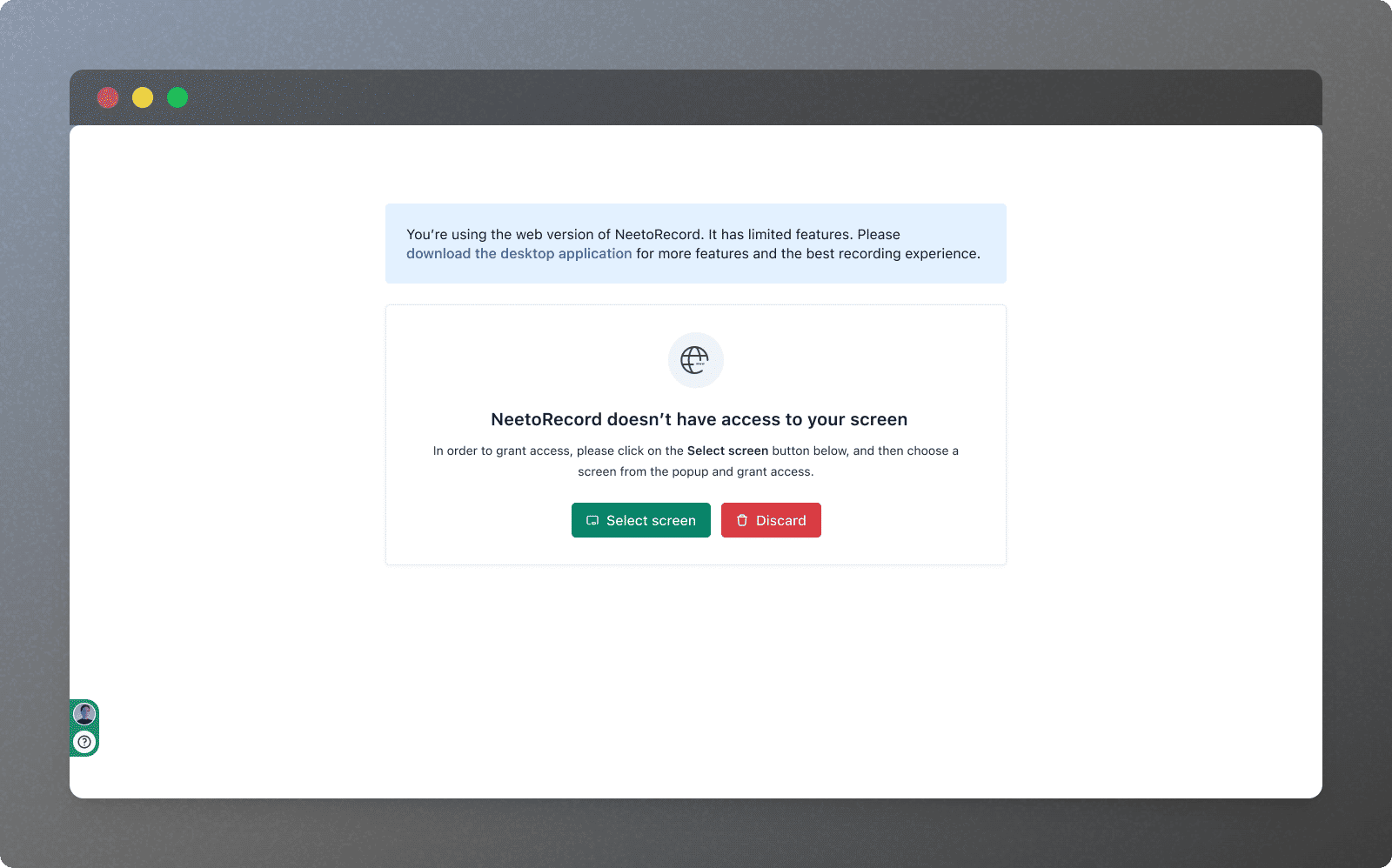
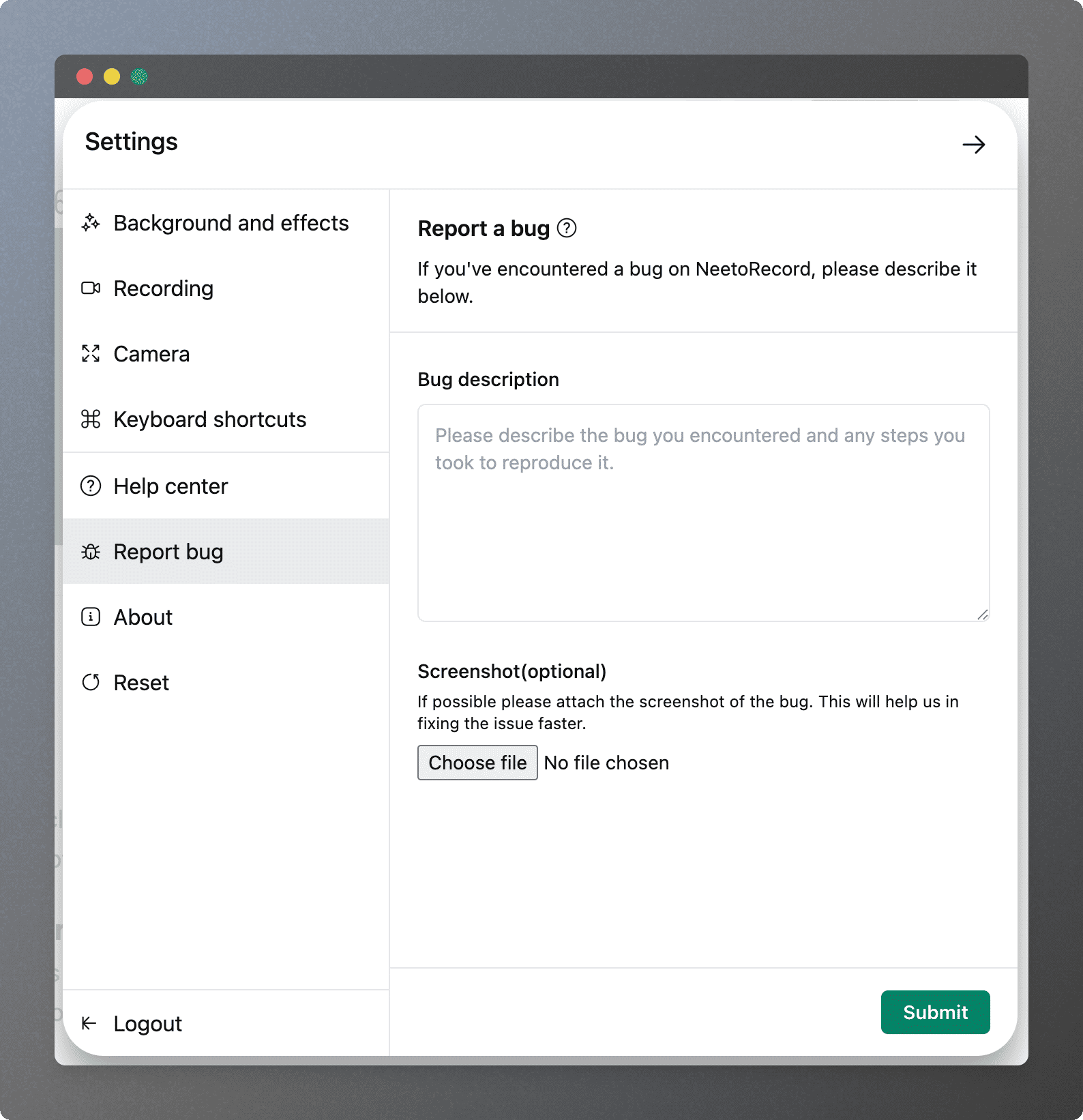
      <content type="html"><![CDATA[<p>Let’s go through what we got done in November 2025 in NeetoRecord.</p><h2><strong>Enhancements 🚀</strong></h2><h4>Select screen UI enhancement</h4><p>The select screen UI has been improved with a cleaner, clearer layout that better separates messages from the available actions.</p><div class="neeto-editor__image-wrapper neeto-editor__image--left neeto-editor__image--bordered"><figure><a href="https://assets-cdn.neetopublish.com/rails/active_storage/blobs/proxy/eyJfcmFpbHMiOnsiZGF0YSI6ImFiZjRjNTM5LTc4YTctNDc4Ni04YTU5LTVmMWNmNTUxZjA5OCIsInB1ciI6ImJsb2JfaWQifX0=--b87c42931b0ff59783ed8cbfc38af6fe349120f2/pawelzmarlak-2025-12-02T11_36_44.298Z_rD1rg8dc5.png" target="_blank" rel="noopener noreferrer" class="neeto-editor__image" style="height:445px;width:712px;display:inline-block;pointer-events:none;"><img src="https://assets-cdn.neetopublish.com/rails/active_storage/blobs/proxy/eyJfcmFpbHMiOnsiZGF0YSI6ImFiZjRjNTM5LTc4YTctNDc4Ni04YTU5LTVmMWNmNTUxZjA5OCIsInB1ciI6ImJsb2JfaWQifX0=--b87c42931b0ff59783ed8cbfc38af6fe349120f2/pawelzmarlak-2025-12-02T11_36_44.298Z_rD1rg8dc5.png" alt="pawelzmarlak-2025-12-02T11_36_44.298Z_rD1rg8dc5.png" figheight="445" figwidth="712" align="left" border="true" draggable="false" contenteditable="false" data-border="true"></a><figcaption style="width:712px;"></figcaption></figure></div><h4>NeetoRecord Chrome Extension — Camera-only UI Update</h4><p>We’ve updated the camera-only recording interface in the NeetoRecord Chrome extension to match the clean and modern design of the desktop app.</p><div class="neeto-editor__image-wrapper neeto-editor__image--left neeto-editor__image--bordered"><figure><a href="https://assets-cdn.neetopublish.com/rails/active_storage/blobs/proxy/eyJfcmFpbHMiOnsiZGF0YSI6IjM3NTE4YmI1LWZiMTAtNDJiNS05NjNhLTJhYmNlNjU1ZDVjNiIsInB1ciI6ImJsb2JfaWQifX0=--8ef8857aacaf7bf08514aecb2c1c2968e22efb8d/Frame_1000003903_cxse2_mkRU.png" target="_blank" rel="noopener noreferrer" class="neeto-editor__image" style="height:395px;width:717px;display:inline-block;pointer-events:none;"><img src="https://assets-cdn.neetopublish.com/rails/active_storage/blobs/proxy/eyJfcmFpbHMiOnsiZGF0YSI6IjM3NTE4YmI1LWZiMTAtNDJiNS05NjNhLTJhYmNlNjU1ZDVjNiIsInB1ciI6ImJsb2JfaWQifX0=--8ef8857aacaf7bf08514aecb2c1c2968e22efb8d/Frame_1000003903_cxse2_mkRU.png" alt="Frame_1000003903_cxse2_mkRU.png" figheight="395" figwidth="717" align="left" border="true" draggable="false" contenteditable="false" data-border="true"></a><figcaption style="width:717px;"></figcaption></figure></div><h4>NeetoRecord Chrome Extension — Bug report</h4><p>In the Chrome extension, we've added an option to include a screenshot when submitting a bug report.</p><div class="neeto-editor__image-wrapper neeto-editor__image--left neeto-editor__image--bordered"><figure><a href="https://assets-cdn.neetopublish.com/rails/active_storage/blobs/proxy/eyJfcmFpbHMiOnsiZGF0YSI6IjA3MGRlMTI0LTQ1N2EtNDczZi04N2YwLWVjZTE3YTU4ZWNmMyIsInB1ciI6ImJsb2JfaWQifX0=--51a0bd760941c7e4f5b5c2770e5b51faf5f6b2ca/pawelzmarlak-2025-12-08T06_17_05.498Z_SsdjZWrwY.png" target="_blank" rel="noopener noreferrer" class="neeto-editor__image" style="height:741px;width:717px;display:inline-block;pointer-events:none;"><img src="https://assets-cdn.neetopublish.com/rails/active_storage/blobs/proxy/eyJfcmFpbHMiOnsiZGF0YSI6IjA3MGRlMTI0LTQ1N2EtNDczZi04N2YwLWVjZTE3YTU4ZWNmMyIsInB1ciI6ImJsb2JfaWQifX0=--51a0bd760941c7e4f5b5c2770e5b51faf5f6b2ca/pawelzmarlak-2025-12-08T06_17_05.498Z_SsdjZWrwY.png" alt="pawelzmarlak-2025-12-08T06_17_05.498Z_SsdjZWrwY.png" figheight="741" figwidth="717" align="left" border="true" draggable="false" contenteditable="false" data-border="true"></a><figcaption style="width:717px;"></figcaption></figure></div><h4>Chrome Extension - Safer recording controls</h4><p>Chrome extension now shows a modal with options to Discard, Resume, or Finish the recording, instead of immediately ending the session, when the user clicks on the extension icon while a recording is in progress.</p><h4>Other minor enhancements</h4><ul class="bulletList"><li><p>Added a tooltip with help icon near the camera only resolution selection explaining if selected resolution will be supported or not.</p></li><li><p>Bug reporting feature is moved to settings page, to match the feature in desktop app.</p></li><li><p>Pro users can now record system audio in the Mac desktop app without needing to install the BlackHole driver.</p></li></ul><hr><h3><strong>Bug fixes ⚒️</strong></h3><h4>Stability &amp; performance fixes</h4><p>The desktop app’s Electron version has been upgraded to fix performance slowness on macOS Tahoe.</p><h4>Mac app icon fix</h4><p>The issue where the app icon on Mac would disappear when clicked has been fixed.</p><h4>External camera selection </h4><p>The issue where users couldn’t select an external camera in the desktop app has been fixed.</p><h4>System audio recording</h4><p>The issue where normal users could record system audio in the Chrome extension has been fixed.</p><h4>Desktop &amp; chrome mic handling</h4><p>The issue where the mic defaulted to the internal microphone in both the Chrome extension and desktop app when the selected device wasn’t functional has been fixed.</p><h4>Windows click highlight</h4><p>The issue where the mouse click highlight feature was not working in the Windows app after the Electron upgrade is now fixed.</p><h4><span style="color: var(--neeto-editor-highlight-text-1)">Upload later recording</span></h4><p>The issue where recordings saved for <strong>“</strong>Upload later” were appearing in the <em>Discarded</em> section is now fixed.</p>]]></content>
    </entry><entry>
       <title><![CDATA[October 2025 updates  Regenerate transcript, improved sidebar, and bug fixes]]></title>
       <author><name>T Sudhish Nair</name></author>
      <link href="https://www.neeto.com/neetorecord/blog/october-2025-updates-regenerate-transcript-improved-sidebar-and-bug-fixes"/>
      <updated>2025-11-06T13:00:04Z</updated>
      <id>https://www.neeto.com/neetorecord/blog/october-2025-updates-regenerate-transcript-improved-sidebar-and-bug-fixes</id>
      <content type="html"><![CDATA[<p>Let’s go through what we got done in October 2025 in NeetoRecord.</p><h2><strong>Enhancements 🚀</strong></h2><p><span data-emoji="" class="neeto-editor-emoji" data-label="✅">✅</span> NeetoRecord now lets you re-generate the transcript with a single click if it fails to generate on the first attempt.</p><p></p><p><span data-emoji="" class="neeto-editor-emoji" data-label="✅">✅</span> NeetoRecord now allows you to add and customize logo in your video, which will be visible to viewers.</p><p></p><p>✅ NeetoRecord’s sidebar UI now features updated icons that make it easier to distinguish between open and closed folders.</p><p></p><p><span data-emoji="" class="neeto-editor-emoji" data-label="✅">✅</span> In Mac app, we have added an option in settings to show the NeetoRecord app icon in the dock.<br></p><p><span>✅</span> NeetoRecord's Chrome extension now features a new Login page and a new Settings page, both designed to match the Desktop app, making the UI and user experience consistent across platforms.</p><p></p><p><span>✅</span> NeetoRecord's Chrome extension now includes a new Background Effects page, similar to the one in the Desktop app.</p><p></p><p><span>✅</span> Now, a discard button is shown on the Select Screen options page when the user cancels the screen/tab selection popup, allowing them to easily return to the dashboard.</p><p></p><p><span>✅</span> Now, the NeetoRecord Chrome extension has an option to select video resolution, with the maximum allowed resolution restricted to 4K.</p><p><br><span>✅</span> In the desktop app, when a user subscribes to Pro, a callout is shown to indicate that the system audio feature is now enabled.</p><h3><strong>Bug Fixes 🐛</strong></h3><p><span data-emoji="" class="neeto-editor-emoji" data-label="✅">✅</span> The issue where chapters were not working on embedded videos is now fixed.<br><br><span data-emoji="" class="neeto-editor-emoji" data-label="✅">✅</span> The issue where the last used monitor would sometimes reset to the main monitor in the desktop app is now fixed.<br><br><span data-emoji="" class="neeto-editor-emoji" data-label="✅">✅</span> The issue where the dock became hidden when recording starts in the Mac desktop app is now fixed.<br><br><span data-emoji="" class="neeto-editor-emoji" data-label="✅">✅</span> The issue where custom size selection on an external monitor behaved unexpectedly in the desktop app is now fixed.<br><br><span data-emoji="" class="neeto-editor-emoji" data-label="✅">✅</span> The issue where recording failed sometimes when there was a network issue in the desktop app is now fixed.<br><br><span data-emoji="" class="neeto-editor-emoji" data-label="✅">✅</span> The issue where the specific window option recorded a different window than the one selected in the desktop app is now fixed.</p><p><br><span data-emoji="" class="neeto-editor-emoji" data-label="✅">✅</span> The issue where videos were not uploading and remained stuck in the progress state in the desktop app is now fixed.<br><br><span data-emoji="" class="neeto-editor-emoji" data-label="✅">✅</span> The issue where the app would crash when re-recording a video multiple times is now fixed.</p><p></p><p><span data-emoji="" class="neeto-editor-emoji" data-label="✅">✅</span> The issue where, in the Chrome extension, no proper message was displayed when camera access was blocked by websites such as WhatsApp, Facebook, Instagram, and others is now fixed.</p><p></p><p><span data-emoji="" class="neeto-editor-emoji" data-label="✅">✅</span> The issue where fonts were not loading correctly on Windows machines, causing an incorrect font fallback, is now fixed.</p><p></p><p><span data-emoji="" class="neeto-editor-emoji" data-label="✅">✅</span> The issue with the desktop app’s custom size mode where full-width selection caused recording failure is now fixed.</p>]]></content>
    </entry><entry>
       <title><![CDATA[September 2025 updates  Countdown UI, chapter copy, and bug fixes]]></title>
       <author><name>T Sudhish Nair</name></author>
      <link href="https://www.neeto.com/neetorecord/blog/september-2025-updates"/>
      <updated>2025-10-06T16:55:28Z</updated>
      <id>https://www.neeto.com/neetorecord/blog/september-2025-updates</id>
      <content type="html"><![CDATA[<p>Let’s go through what we got done in September 2025 in NeetoRecord.</p><h3><strong>Enhancements ✨</strong></h3><p><span data-emoji="" class="neeto-editor-emoji" data-label="✅">✅</span> The recording countdown UI has been improved, and a tick sound has been added during the countdown to notify the user that the recording is about to start.</p><p></p><p><span data-emoji="" class="neeto-editor-emoji" data-label="✅">✅</span> An error message along with the option to report bug is now shown when the recording fails, instead of failing silently.</p><p></p><p><span data-emoji="" class="neeto-editor-emoji" data-label="✅">✅</span> Users can now copy entire chapters, and some minor UI improvements have also been made.</p><p></p><p><span data-emoji="" class="neeto-editor-emoji" data-label="✅">✅</span> Camera background effects are now disabled on low-resource desktops to improve performance.</p><p></p><p><span data-emoji="" class="neeto-editor-emoji" data-label="✅">✅</span> The folder structure UI on the sidebar has been improved with new icons that make it much more evident which folders are open or closed.</p><h3><strong>Bug Fixes 🐛</strong></h3><p><span data-emoji="" class="neeto-editor-emoji" data-label="✅">✅</span> The issue causing the Mac Dock to hide while recording videos using the NeetoRecord Desktop app has now been resolved.</p><p></p><p><span data-emoji="" class="neeto-editor-emoji" data-label="✅">✅</span> The issue where the alert popups appeared at the bottom of the screen has now been resolved.</p><p></p><p><span data-emoji="" class="neeto-editor-emoji" data-label="✅">✅</span> The issue where the auto-generation of title, summary, and chapters occasionally failed to occur is now fixed.</p><p></p><p><span data-emoji="" class="neeto-editor-emoji" data-label="✅">✅</span> The issue where the <code>Copy Link</code> button was still visible even after enabling the <code>Hide Copy Link Button on Embedded Recordings</code> option is now fixed.</p><p></p><p><span data-emoji="" class="neeto-editor-emoji" data-label="✅">✅</span> The issue where unpublished forms could be linked to videos, resulting in a 404 error when attempting to access the forms is now fixed.</p>]]></content>
    </entry><entry>
       <title><![CDATA[August 2025 updates - GIF preview, thumbnail improvements and more]]></title>
       <author><name>Kirti Gulati</name></author>
      <link href="https://www.neeto.com/neetorecord/blog/august-2025-updates-gif-preview-thumbnail-improvements-and-more"/>
      <updated>2025-09-03T18:30:00Z</updated>
      <id>https://www.neeto.com/neetorecord/blog/august-2025-updates-gif-preview-thumbnail-improvements-and-more</id>
      <content type="html"><![CDATA[<p><span>Let’s go through what we got done in August 2025 in NeetoRecord.</span></p><h2><strong>Enhancements ✨</strong></h2><h4>✅ <strong>Thumbnail upload improvements</strong></h4><p>We’ve made several improvements to make thumbnail uploads smoother and more consistent:</p><ul class="bulletList"><li><p>You can now upload both JPEG and PNG thumbnails for more flexibility.</p></li><li><p>Uploaded thumbnails now stay in place without flickering or reverting.</p></li><li><p>After uploading a thumbnail, the video resets to 00:00 and refreshes, making the new thumbnail visible right away.</p></li><li><p>You’ll now get a clear confirmation message when a thumbnail upload succeeds.</p></li></ul><h4>✅ <strong>GIF preview improvements</strong></h4><p>We’ve enhanced the GIF preview feature for better usability in Gmail, Google Docs, and other platforms that don’t support embedding:</p><ul class="bulletList"><li><p>Clearer labeling as “GIF preview” so its purpose is obvious.</p></li><li><p>Updated text and description to explain higher click rates vs plain links.</p></li><li><p>New preview design to show how a GIF will appear inside Gmail.</p></li><li><p>Ability to copy the GIF thumbnail directly for sharing.</p></li></ul><h4>✅ Split and trim feedback</h4><p>While editing videos, you’ll now see a clear message that editing is in progress. Additional edits are blocked until the current action finishes, removing confusion about whether trimming is complete.</p><h2>Bug fixes <span data-emoji="" class="neeto-editor-emoji" data-label="🐛">🐛</span> </h2><ul class="bulletList"><li><p>Fixed issue where videos failed to play smoothly due to buffering and visual glitches.</p></li><li><p>Fixed duration filter so it applies correctly based on the table’s displayed duration.</p></li><li><p>Fixed toolbar width issue.</p></li><li><p>Fixed desktop app pop-up button display.</p></li><li><p>Fixed embedded video playback issues.</p></li><li><p>Fixed camera freezing on Windows when the countdown timer is used.</p></li><li><p>Fixed transcript by forcing regeneration in certain cases.</p></li><li><p>Fixed the issue where the camera sometimes appeared behind other windows on Windows.</p></li><li><p>Fixed video encoding pipeline to add preprocessing, making videos more suitable for editing.</p></li></ul>]]></content>
    </entry><entry>
       <title><![CDATA[July 2025 updates - Custom backgrounds, camera controls, and more]]></title>
       <author><name>Alan Mathews</name></author>
      <link href="https://www.neeto.com/neetorecord/blog/july-2025-updates-google-sheet-integration-add-tips-and-more"/>
      <updated>2025-08-02T07:00:11Z</updated>
      <id>https://www.neeto.com/neetorecord/blog/july-2025-updates-google-sheet-integration-add-tips-and-more</id>
      <content type="html"><![CDATA[<p>Let’s go through what we got done in July 2025 in NeetoRecord.</p><h3><strong>New features</strong> ✨</h3><p></p><p><strong>✅ Upload custom background images [Desktop app]</strong><br>Personalize your recording environment by uploading your own background images right inside the desktop app. Make every recording look unique and tailored to your brand or mood.</p><p></p><p><strong>✅ Change mouse click highlight color [Desktop app]</strong><br>Choose your preferred color for mouse click highlights during screen recordings. Great for making clicks stand out and matching your personal or team style.</p><p></p><p><strong>✅ Flip/mirror your camera feed [Chrome extension]</strong><br>You can now flip or mirror your camera feed for a more natural, comfortable presentation—especially helpful for presenters who want their camera to match their screen layout.</p><p></p><p><strong>✅ Show/hide countdown timer before recording starts [Chrome extension]</strong><br>Want a few seconds to compose yourself before filming? You can now choose to show or hide the countdown timer before a screen recording begins in the Chrome extension.</p><p></p><p><strong>✅ Hide the toolbar [Chrome extension]</strong><br>Prefer a clean, distraction-free workspace? You can now hide the recording toolbar in the Chrome extension whenever you want.</p><p></p><p><strong>✅ Change camera bubble size and shape [Chrome extension]</strong><br>Easily adjust the size of your camera bubble or switch between shapes—for instance, from a circle to a square—so your webcam overlay suits any style or content.</p><h3><strong>Enhancements</strong> ✨</h3><p></p><p><strong>✅ Responsive CTA page [Web]</strong><br>The Call-to-Action (CTA) page is now fully responsive, adapting gracefully to any screen size for a consistent experience on desktop, tablet, or mobile.</p><p></p><p><strong>✅ Improved form embedding [Web]</strong><br>Embedded forms now expand to use the maximum available space, making them easier to read and fill out, no matter where you place them.</p><p></p><p><strong>✅ Preserved video watch state [Web]</strong><br>Your progress in any video is now remembered, even if you move videos between folders or navigate to different pages—so you never lose your place.</p><p></p><h4>Bug fixes </h4><ul><li><p>Fixed an issue with the bottom portion of the video being cut off when viewed on wide screens.</p></li><li><p>Fixed validations for number fields in filters.</p></li><li><p>Fixed title length validations.</p></li><li><p>Fixed video cut-off issue when viewed on a mobile screen.</p></li><li><p>Fixed validations for number fields in filters.</p></li><li><p>Fixed search in transcript to give correct results and total count.</p></li><li><p>Fixed issue where mic was not working for certain cases.</p></li><li><p>Fixed admin panel sidebar visibility for users without admin permissions.</p></li><li><p>Fixed visibility of dropdown and buttons for table row actions.</p></li><li><p>Fixed user profile photo not being shown.</p></li><li><p>Fixed Camera and Mic dropdown not closing when clicking outside.</p></li><li><p>Fixed text overflow in microphone permission dialog.</p></li><li><p>Fixed bug where webcam got stuck if mic source changed during recording.</p></li></ul>]]></content>
    </entry><entry>
       <title><![CDATA[Milestone M39 - Capture leads, improved retry feature and more]]></title>
       <author><name>Chirag Shah</name></author>
      <link href="https://www.neeto.com/neetorecord/blog/milestone-m39"/>
      <updated>2025-07-01T12:24:03Z</updated>
      <id>https://www.neeto.com/neetorecord/blog/milestone-m39</id>
      <content type="html"><![CDATA[<p>Let's go through what we got done in Milestone M39 (Jun 16 - Jun 29).</p><p></p><h2><strong>New Features 🚀</strong></h2><h3><strong>Turn views into leads! 🧲</strong></h3><p>With NeetoForm integration, you can now show a form overlay in your recording and collect submissions without missing a beat. Choose when it appears and collect responses effortlessly!</p><p></p><h4>🚀 Enhancements</h4><ul><li><p>(Desktop application) Hide shape switcher for camera only mode.</p></li><li><p>(Desktop application) Improvements to retry and upload later feature.</p></li><li><p>(Desktop application) Allow bug reporting submission even if tab is switched.</p></li></ul><h4>🐛 Bug fixes</h4><ul><li><p>(Web) Prevented video loading again on updates made on the basic info page.</p></li><li><p>(Web) Fixed transcript loading spinner for videos without audio.</p></li><li><p>(Web) Fixed spacebar causing scroll instead of video pause/unpause.</p></li><li><p>(Web) Fixed occurrences count for search results.</p></li><li><p>(Web) Fixed disabling branding not removing logo in Admin side.</p></li><li><p>(Web) Fixed embed reload error.</p></li><li><p>(Web) Fixed zoom selection rectangle going out of bounds.</p></li><li><p>(Web) Fixed selected items count for bulk actions.</p></li><li><p>(Web) Fixed zoom getting added at the same timestamp on multiple clicks.</p></li><li><p>(Web) Fixed "Watch on NeetoRecord" &amp; "Copy link" buttons not functioning when the recording is embedded on a website.</p></li><li><p>(Desktop application) Prevent adding negative values for custom size selection.</p></li><li><p>(Desktop application) Fixed video resolution selector jumping issue.</p></li><li><p>(Chrome extension) Fixed video getting freezed on background change.</p></li></ul>]]></content>
    </entry><entry>
       <title><![CDATA[Milestone M38 - Buffered indicator on progress bar, improved CTA feature, UI improvements and more]]></title>
       <author><name>Chirag Shah</name></author>
      <link href="https://www.neeto.com/neetorecord/blog/milestone-m38"/>
      <updated>2025-06-16T19:39:30Z</updated>
      <id>https://www.neeto.com/neetorecord/blog/milestone-m38</id>
      <content type="html"><![CDATA[<p>Let's go through what we got done in Milestone M38 (Jun 02 - Jun 15).</p><p></p><h2><strong>New Features 🚀</strong></h2><h4>Know what’s ready to roll! ⏩</h4><p>The progress bar now shows buffered sections, so you can skip ahead with confidence—no more waiting!</p><p></p><h4>Enhancements</h4><ul><li><p>(Web) Improvements to CTA feature - UI/UX cleanup, color picker for button and text, "show only at end" toggle, live preview of CTA before save and more.</p></li><li><p>(Web) Updated UI for chapters generation.</p></li><li><p>(Web) Improved editor UI for waveforms in dark mode.</p></li><li><p>(Web) Improved UI for embedded videos.</p></li><li><p>(Web) Recordings can now be shared with autoplay and video muted options.</p></li><li><p>(Web) Improvements to onboarding flow.</p></li><li><p>(Chrome extension) You can now stop recording by clicking the extension icon.</p></li><li><p>(Desktop app) UI improvements to Pending uploads, discarded videos and upload later.</p></li></ul><h4>Bug fixes</h4><ul><li><p>(Web) Fixed bulk deletion timing out sometimes.</p></li><li><p>(Web) Fixed deleting a recording not updating the recordings count for folders.</p></li><li><p>(Web) Fixed sorting for folders.</p></li><li><p>(Web) Right and left arrows now seek 5 seconds, consistent with the buttons.</p></li><li><p>(Web) Blocked negative values for trimming.</p></li><li><p>(Web) Fixed bug where edited transcripts were not being shown on the public page.</p></li><li><p>(Chrome extension) Removed permission alerts while recording in progress.</p></li></ul>]]></content>
    </entry><entry>
       <title><![CDATA[Milestone M37 - Volume graph, draw selection area and more]]></title>
       <author><name>Chirag Shah</name></author>
      <link href="https://www.neeto.com/neetorecord/blog/milestone-m37"/>
      <updated>2025-06-03T06:19:57Z</updated>
      <id>https://www.neeto.com/neetorecord/blog/milestone-m37</id>
      <content type="html"><![CDATA[<p>Let's go through what we got done in Milestone M37 (May 19 - Jun 01, 2025).</p><p></p><h2>New Features<span data-emoji="" class="neeto-editor-emoji" data-label="🚀">🚀</span> </h2><h4><strong>✅ </strong>Edit with your eyes (and ears)! 👀👂</h4><p>We have added a volume graph to the editor so you can easily find parts with sound and silence. Editing just got smarter.</p><p></p><h3><strong>Desktop App Enhancements 🖥️</strong></h3><ul><li><p>Added option to mirror camera.</p></li><li><p>Added support to allow draw selection area for custom size.</p></li></ul><h3><strong>Web Enhancements 🌐</strong></h3><ul><li><p>Editor improvements - better slider, default fit to screen width, no more extended scrolling.</p></li><li><p>Ability to copy video link starting from a particular timestamp.</p></li></ul><h3><strong>Bug Fixes 🐛</strong></h3><ul><li><p>(Web) Fixed adding CTA when video is processing.</p></li><li><p>(Chrome extension) Removed duplicate entries in mic selection list.</p></li><li><p>(Desktop application) Fixed launch/disable launch at startup.</p></li><li><p>(Desktop application) Fixed avatar icon getting warped on the desktop app.</p></li><li><p>(Desktop application) Added warning message for users to indicate that auto zoom and mouse click highlight only works when recording entire screen.</p></li><li><p>(Desktop application) Fixed custom size aspect ratio when going out of bounds.</p></li><li><p>(Desktop application) Removed duplicate entries in mic selection list.</p></li></ul>]]></content>
    </entry><entry>
       <title><![CDATA[Milestone M36  Smarter Editing, Smoother Sharing, and More]]></title>
       <author><name>Ajmal Noushad</name></author>
      <link href="https://www.neeto.com/neetorecord/blog/milestone-m36-smarter-editing-smoother-sharing-and-more"/>
      <updated>2025-05-22T07:08:14Z</updated>
      <id>https://www.neeto.com/neetorecord/blog/milestone-m36-smarter-editing-smoother-sharing-and-more</id>
      <content type="html"><![CDATA[<p>Let's go through what we got done in Milestone M36 (May 5 - May 18, 2025).</p><h2>New Features<span data-emoji="" class="neeto-editor-emoji" data-label="🚀">🚀</span> </h2><h4><strong>✅ </strong>Save recordings locally without uploading</h4><p>You can now save your recordings <a rel="noopener noreferrer nofollow" class="link" href="https://roadmap.neetorecord.com/changelogs/save-directly-to-local-machine">directly to your local machine</a> right after creating them, with the option to skip uploading to your workspace entirely. Or choose to do both – upload to workspace and save locally at the same time.</p><h3><strong>Desktop App Enhancements 🖥️</strong></h3><p></p><p><strong>✅ Square shape option for camera bubble</strong></p><p>Choose between <a rel="noopener noreferrer nofollow" class="link" href="https://help.neetorecord.com/articles/camera-bubble-size#change-camera-shape">circle and square shapes</a> for your camera bubble display.</p><p></p><p><strong>✅ Resize camera bubble during recording</strong></p><p>You can now <a rel="noopener noreferrer nofollow" class="link" href="https://help.neetorecord.com/articles/camera-bubble-size#change-camera-shape">resize your camera bubble</a> while recording is in progress.</p><p></p><p><strong>✅ Manual updates removed</strong></p><p>The app already <a rel="noopener noreferrer nofollow" class="link" href="https://help.neetorecord.com/articles/automatic-updates">updates automatically</a>, so we’ve removed the manual updates option to keep things simpler.</p><p></p><p><strong>✅ Pending uploads now show video durations</strong></p><p>Pending uploads now display video durations, giving you better visibility into what's being processed.</p><p></p><p><strong>✅ Direct billing access when at capacity</strong></p><p>When you've hit your limit, we now show a direct link to the billing page, making it easier to upgrade when you need to.</p><p></p><hr><h3><strong>Web Enhancements 🌐</strong></h3><p></p><p><strong>✅ Boosted input audio volume for web recordings</strong></p><p>We've increased the input audio volume for recordings made via the Web recorder and Chrome extension, ensuring your voice comes through clearly.</p><p></p><p>✅ <strong>Share from the exact moment</strong></p><p>You can now <a rel="noopener noreferrer nofollow" class="link" href="https://help.neetorecord.com/articles/share-recording-at-timestamp">share recordings by timestamp</a> directly from the public watch page. Perfect for directing viewers to specific moments in your recording.</p><p></p><p><strong>✅ Hiding buttons in embedded videos</strong></p><p>You now have the option to <a rel="noopener noreferrer nofollow" class="link" href="https://help.neetorecord.com/articles/recording-options">hide "Watch on NeetoRecord" and "Copy link" buttons</a> for embedded recordings for a cleaner viewer experience.</p><p></p><p><strong>✅ Timely upgrade prompts</strong></p><p>We added an upgrade button that appears when you're close to your recording limit, helping you avoid interruptions at crucial moments.</p><p></p><p><strong>✅ Move recordings to folders from the recording page</strong></p><p>Organize your content effortlessly by moving recordings to <a rel="noopener noreferrer nofollow" class="link" href="https://help.neetorecord.com/articles/folders">folders</a> directly from the recording page, without having to navigate back to the main library.</p><p></p><hr><h3><strong>Editor Improvements ✂️</strong></h3><ul><li><p>Hit the delete key to delete clips—just like you’d expect.</p></li><li><p>The video keeps playing even while you’re navigating—no interruptions.</p></li><li><p>Minimum zoom now fits the full video into view for easier trimming.</p></li><li><p>Improved UI for splitting video clips.</p></li><li><p>You can now adjust playback speed right from the editor.</p></li><li><p>Navigate away with unsaved edits? You’ll get a warning before losing work.</p></li><li><p>No more scrolling past the end of your video duration—a cleaner timeline.</p></li></ul><p></p><hr><h3><strong>Bug Fixes 🐛</strong></h3><ul><li><p>Fixed an issue where Intel builds were pushed to Apple Silicon Macs.</p></li><li><p>Resolved a bug with the “Save to local” feature.</p></li><li><p>Zooming in the editor now stays within bounds.</p></li><li><p>Global settings for hiding embedded recording titles now work as expected.</p></li><li><p>Monthly report emails will now correctly display video thumbnails.</p></li><li><p>Fixed auto zoom-related issue going out of bounds.</p></li><li><p>Fixed microphone permission dialog redirecting to login.</p></li></ul><p></p><hr><p></p><p>That’s a wrap for M36. Every tweak and fix is designed to help you record, edit, and share with less friction and more clarity. On to the next! 💪</p>]]></content>
    </entry><entry>
       <title><![CDATA[Milestone M35 - Call to Action(CTA), share page improvements and more]]></title>
       <author><name>Chirag Shah</name></author>
      <link href="https://www.neeto.com/neetorecord/blog/milestone-m35"/>
      <updated>2025-05-05T13:46:02Z</updated>
      <id>https://www.neeto.com/neetorecord/blog/milestone-m35</id>
      <content type="html"><![CDATA[<p>Let's go through what we got done in Milestone M35 (Apr 21 - May 04).</p><h2><strong>New Features 🚀</strong></h2><h4><strong>✅ </strong>Add Call to Action buttons to your recordings</h4><p>Turn views into action with <a rel="noopener noreferrer nofollow" class="link" href="https://roadmap.neetorecord.com/changelogs/add-call-to-action-button">clickable CTAs</a>. Add buttons that link to anything—like booking a call, your website, or social media. You can choose when each CTA appears, set its position on the video, and customize its theme.</p><p></p><h4>Enhancements</h4><ul><li><p>UI for the share page has been updated.</p></li><li><p>The folder tree is now hidden when no folders are present.</p></li><li><p>We now redirect to the admin page from the public recording link if <code>/edit</code> is added to the URL.</p></li><li><p>Controls are automatically hidden on the recording preview page. This is now consistent with the public page of the recording.</p></li></ul><h4>Bug fixes</h4><ul><li><p>For the upload feature, the file dropzone is now disabled while the upload is in progress. This is to prevent bugs.</p></li></ul>]]></content>
    </entry><entry>
       <title><![CDATA[Milestone M34 - nested folders, teleprompter, safe discards and more]]></title>
       <author><name>Chirag Shah</name></author>
      <link href="https://www.neeto.com/neetorecord/blog/milestone-m34-updates"/>
      <updated>2025-04-21T20:12:05Z</updated>
      <id>https://www.neeto.com/neetorecord/blog/milestone-m34-updates</id>
      <content type="html"><![CDATA[<p>Let's go through what we got done in Milestone M34 (Apr 7 - Apr 20).</p><h2><strong>New features 🚀</strong></h2><h4><a rel="noopener noreferrer nofollow" class="header-wrapper-link link" href="https://neeto.com/neetocal/blog/milestone-m34-group-meeting-packages-contacts-and-more#-meeting-outcome"><strong>✅</strong></a><strong> Support for nested folders</strong></h4><p>You can now organize your recordings with up to 3 levels of <a rel="noopener noreferrer nofollow" class="link" href="https://neetorecordhelp.neetokb.com/articles/folders">nested folders</a>. This helps in keeping your recordings neatly categorized and easy to find.</p><h4>✅ <strong>Auto-scrolling Teleprompter</strong></h4><p>The speaker notes feature now comes with an <a rel="noopener noreferrer nofollow" class="link" href="https://neetorecordhelp.neetokb.com/articles/speaker-notes#use-auto-scrolling-teleprompter">auto-scrolling teleprompter</a>. You can set scroll speed and font size based on your preferences. This keeps your notes moving at the right pace, so you can stay focused and deliver your message smoothly.</p><h4>✅ <strong>Recover Discarded Recordings</strong></h4><p>If you accidentally discard or restart a recording, you can still <a rel="noopener noreferrer nofollow" class="link" href="https://neetorecordhelp.neetokb.com/articles/recover-discarded-videos">recover</a> it by uploading it or saving it locally. Discarded videos remain available for recovery for up to 3 days.</p><h4>Bug fixes</h4><ul><li><p>(Web) Fixed bugs related to mp4 conversion and resolution.</p></li><li><p>(Web) Set the thumbnail url if it's not present on upload.</p></li><li><p>(Chrome Extension) Don't hide the camera when switching to a Chrome tab.</p></li><li><p>(Desktop application) Remove unwanted ways in which recordings were getting discarded.</p></li></ul><p>That’s all for M34! We hope these updates make recording with NeetoRecord more helpful.</p>]]></content>
    </entry><entry>
       <title><![CDATA[Milestone M33 - smarter reports, speedup processing and more]]></title>
       <author><name>Chirag Shah</name></author>
      <link href="https://www.neeto.com/neetorecord/blog/milestone-m33-updates"/>
      <updated>2025-04-07T05:37:50Z</updated>
      <id>https://www.neeto.com/neetorecord/blog/milestone-m33-updates</id>
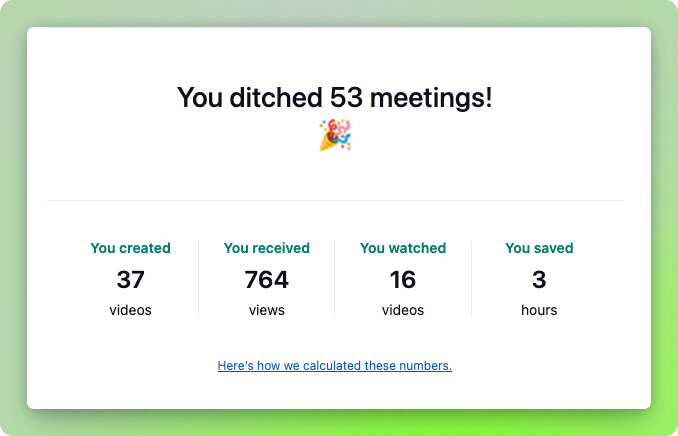
      <content type="html"><![CDATA[<p>Let's go through what we got done in Milestone M33 (Mar 24 - Apr 06).</p><p></p><p><strong>Smarter reports, sharper insights! 🧠</strong><br>We’ve upgraded the monthly report email to include meetings ditched, views gained, and time saved. See the impact of your recordings at a glance!</p><div class="neeto-editor__image-wrapper neeto-editor__image--left"><figure><a href="https://assets-cdn.neetopublish.com/rails/active_storage/blobs/proxy/eyJfcmFpbHMiOnsiZGF0YSI6ImZiNzYwODRhLTcwNjMtNGRiMi05YWIwLWExZThiMWVjY2ZlYyIsInB1ciI6ImJsb2JfaWQifX0=--ba0cd212b569ed13c052ee5e1986d1954e36007a/SCR-20250407-jxhu.png" target="_blank" rel="noopener noreferrer" class="neeto-editor__image" style="height:auto;width:500px;display:inline-block;pointer-events:none;"><img src="https://assets-cdn.neetopublish.com/rails/active_storage/blobs/proxy/eyJfcmFpbHMiOnsiZGF0YSI6ImZiNzYwODRhLTcwNjMtNGRiMi05YWIwLWExZThiMWVjY2ZlYyIsInB1ciI6ImJsb2JfaWQifX0=--ba0cd212b569ed13c052ee5e1986d1954e36007a/SCR-20250407-jxhu.png" alt="SCR-20250407-jxhu.png" figheight="auto" figwidth="500" align="left" draggable="false" contenteditable="false"></a><figcaption style="width:500px;">Monthly report email</figcaption></figure></div><h4>Enhancements</h4><ul><li><p>(Desktop application) Speedup processing times for recordings with custom size.</p></li></ul><h4>Bug fixes</h4><ul><li><p>(Web) Fixed bug on edit page by reloading the page on a successful edit.</p></li><li><p>(Web) Fixed auto loading thumbnail after it is generated.</p></li><li><p>(Desktop application) Handled writing to disk when recording id not ready.</p></li><li><p>(Chrome extension) Fixed dropdown alignment.</p></li></ul>]]></content>
    </entry><entry>
       <title><![CDATA[Milestone M32 - link expiry improvement, cleaner info page and more]]></title>
       <author><name>Chirag Shah</name></author>
      <link href="https://www.neeto.com/neetorecord/blog/milestone-m32-updates"/>
      <updated>2025-03-25T09:07:44Z</updated>
      <id>https://www.neeto.com/neetorecord/blog/milestone-m32-updates</id>
      <content type="html"><![CDATA[<p>Let's go through what we got done in Milestone M32 (Mar 10 - Mar 23).</p><p></p><h4>Enhancements</h4><ul><li><p>(Web) We made some improvements to the link expiry feature related to helper messages.</p></li><li><p>(Web) The basic info page on the web is now more cleaner and got some improvements.</p></li><li><p>(Web) We added a few fixes to make the title and summary generation faster.</p></li></ul><h4>Bug fixes</h4><ul><li><p>(Web) Fixed a bug where inviting users from access control was not sending emails.</p></li><li><p>(Web) Because of some recent changes, the embed functionality had a bug. This has been fixed now.</p></li><li><p>(Web) Sometimes the title spinner used to show indefinitely even when the title after the title was generated. This has been fixed.</p></li><li><p>(Web) For short videos (&lt; 5 seconds) we dont generate the transcript. But we still used to show the spinner indicating that the transcript was being generated. We have hid the spinner now.</p></li><li><p>(Web) Fixed folder deletion which had soft deleted recordings.</p></li><li><p>(Desktop application) Fixed memory issues for long recording.</p></li><li><p>(Desktop application) Fixed "My videos" not being clickable.</p></li><li><p>(Desktop application) Fixed an issue with "Custom size" on Windows where discarding a recording caused subsequent recordings to fail.</p></li></ul>]]></content>
    </entry><entry>
       <title><![CDATA[Desktop app v1.11.6 released]]></title>
       <author><name>Farhan ck</name></author>
      <link href="https://www.neeto.com/neetorecord/blog/desktop-app-v1-11-6-released"/>
      <updated>2025-03-18T17:06:23Z</updated>
      <id>https://www.neeto.com/neetorecord/blog/desktop-app-v1-11-6-released</id>
      <content type="html"><![CDATA[<p>NeetoRecord desktop app v1.11.6 has been released. It has the following changes.</p><p></p><ul><li><p>Fixed a critical memory issue that caused recordings to be lost during long recording sessions.</p></li><li><p>Fixed "My videos" profile icon not clickable.</p></li><li><p>Fixed an issue with "Custom size" on Windows where discarding a recording caused subsequent recordings to fail.</p></li></ul>]]></content>
    </entry>
    </feed>